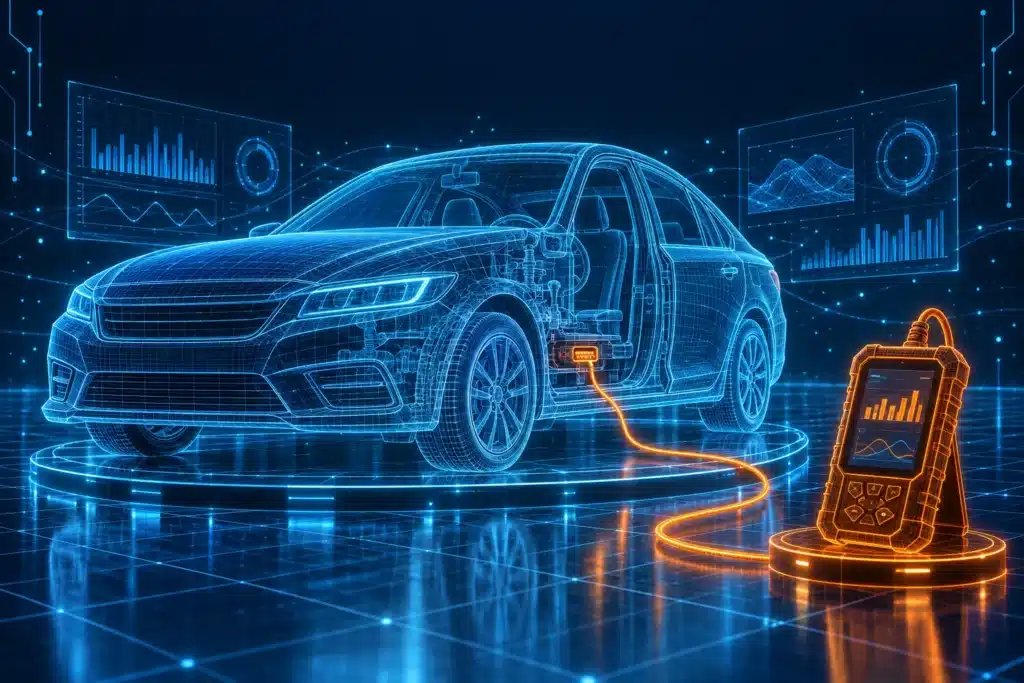
Quick answer: Start with the job, not the scanner. If you only want to find out why the Check Engine light is on, a basic code reader or a small Bluetooth adapter is enough. If you want to check ABS, airbags, the transmission or other systems, you need a scanner that reads more than the engine. If you want to test parts or do service resets, look for bidirectional control and service functions. Before you buy anything, check that it supports your exact car and the exact function you need.
Pick your situation
- I just got a Check Engine light and I’m new to this: start with Sections 1 to 4.
- I want to know which type of scanner fits me: go to Section 5.
- I work on my own cars and want more than codes: go to Sections 8 to 10.
- I own several vehicles or an older or special car: go to Sections 9, 11 and 12.
- I’m worried about cost, updates or damaging my car: go to Sections 14 and 15.
- I’m ready to decide: go to Sections 17 to 19.
Affiliate Disclosure: As an Amazon Associate I earn from qualifying purchases. Scan Choice Guide is a participant in the Amazon Services LLC Associates Program, an affiliate advertising program designed to provide a means for sites to earn advertising fees by advertising and linking to Amazon.com.
I’m Slobodan, and I put this guide together with Ivan Tatić, a working mechanic who uses scan tools every day. Most guides about OBD2 scanners start with a list of products. We start with you and your car, because the right scanner depends on what you need it to do.
Read it in order if you’re new. Jump around if you already know the basics. Every section stands on its own, and when a topic needs more room, we point you to a longer article on this site.
1. Do You Actually Need an OBD2 Scanner?
Most people look for a scanner for one reason: the Check Engine light came on.
That light has a name, the malfunction indicator lamp. Your car’s computer turns it on when it finds a problem with something it watches, mostly the engine and the emissions system. The U.S. Environmental Protection Agency explains that a steady light means the car needs service, not that you must stop driving right away. A blinking light is different. The EPA says it points to a serious engine misfire that needs attention quickly, because it can damage the catalytic converter. You can read the EPA fact sheet on on-board diagnostics yourself.
A scanner tells you why the light is on. It reads the trouble code the computer saved, and that code points you toward the system that has the problem.

You may want one if:
- The Check Engine light is on or keeps coming back.
- The car runs rough, hesitates or burns more fuel than before.
- You failed an emissions test and want to see what the car is reporting.
- You do your own repairs and want to confirm a fix.
- You’re about to buy a used car and want to check it before you pay.
You may not need one if the light came on once and went away, and the car drives normally. Even then, a scanner is cheap insurance, because it shows you what the car saw.
Can you get the codes read for free? In the U.S., many auto parts stores will read your codes at no charge. That’s a fair way to find out what the light means once. It’s worth doing if you don’t want to buy anything yet.
So why buy your own? A few reasons come up over and over:
- You can check any time. The light comes on at night or on a trip, and you don’t have to wait for a store to open.
- You keep the details. A store may only give you the code. Your own scanner lets you save freeze frame data and live readings, which is what you need when you’re trying to find the cause.
- You can check your work. After a repair, you can scan again to see if the problem is really gone.
- You can look before you buy a used car. A quick scan can show stored codes and whether the car’s emissions monitors are ready.
- You save on repeat visits. If your car throws codes now and then, owning the tool pays off quickly.
If none of those sounds like you, a free read at a store may be all you need. We say that plainly, because the right answer is the one that fits your situation.
Ivan Tatić, SCG Technical Consultant
“I read the codes before I touch anything, and I write them down before I clear them. People often come to me after they’ve erased the codes with a cheap reader, and then I’ve lost the information the car was trying to give me. A scanner is most useful when you treat it as a way to see, not as a way to make the light go away.”
2. What OBD2 Is, in Plain English
The name OBD2 is short for second-generation on-board diagnostics. It’s the system built into your car that watches how the engine and emissions parts are working, and stores a code when something goes wrong.
In the United States, OBD2 became required on new passenger cars and light trucks starting with the 1996 model year. The rule behind it is public, and you can read the EPA’s Federal Register notice from 1996 about the OBD II requirements. That’s why shops say a car from 1996 or newer should work with a basic scanner. It’s also why a car older than that usually won’t.
A few things worth knowing:
- Every OBD2 car has the same type of plug, so a basic scanner fits any of them.
- Since the 2008 model year, cars sold in the U.S. use a modern communication method called CAN. You don’t have to understand CAN to use a scanner. It’s the language the car and the scanner use to talk.
- OBD2 is a minimum standard. It covers engine and emissions data that every maker must share. Systems like airbags, ABS brakes and the transmission are often outside it, so the scanner needs extra software for them.
That last point matters for your buying decision, and we’ll come back to it in Sections 8 and 9.
What the car checks. OBD2 doesn’t only wait for a failure. The car runs its own self-tests, called monitors, on things like the catalytic converter, the oxygen sensors and the fuel vapor system. Each monitor reports a status: ready or not ready. In places that use the OBD2 plug for emissions inspections, the station reads those statuses and any stored codes.
This matters for one very common mistake. If you clear codes right before an inspection, the monitors can reset to “not ready,” and the car may be turned away until it has been driven enough to finish its tests. A good scanner shows you the monitor status, so you know before you go.
Why the standard exists. The system was designed so that any shop could read any car’s basic data with one kind of tool. That’s why a simple code reader from any brand fits any 1996 or newer car. The things that differ from maker to maker are the extras, such as airbags, ABS and body electronics, and that’s where the price and the buying decision get more complicated.
If you want the full story, our article What Is OBD2 and How Does an OBD2 Scanner Work? goes deeper. And if you’re wondering how this differs from the older system, read OBD2 vs OBD1: What’s the Difference?
3. Where the OBD2 Port Is and Where a Scanner Gets Its Power
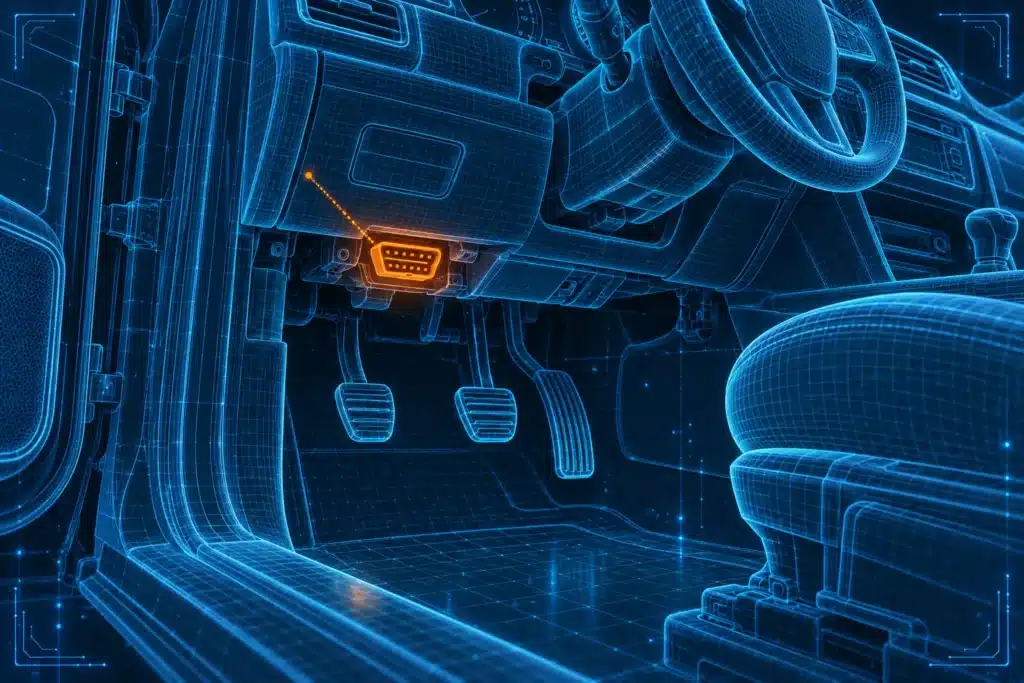
The OBD2 port has a name, the data link connector. It’s a plug with 16 holes in a trapezoid shape, a bit wider at the top than at the bottom.
The standard that defines the port says it must be within about two feet of the steering wheel. In practice, it’s almost always on the driver’s side under the dashboard, often to the left of the steering column or above your left knee. Some cars hide it behind a small cover. If you can’t find it, look in the owner’s manual or check the area around the fuse panel with a flashlight.
Now the part many beginners ask about: does a scanner have batteries?
In most cases, it doesn’t need them. One of the 16 holes, pin 16, carries power from the car’s own battery (12 volts on regular cars). When you plug in a code reader or a small Bluetooth adapter, it takes its power from that pin and turns on by itself. Two other holes are grounds, and the rest carry data.

Some larger scanners, like tablet-style ones, also have their own rechargeable battery so you can use them away from the car or charge them separately. We cover that in Section 6.
One practical point: because the scanner uses the car’s power, a weak car battery can cause strange behavior. If the scanner won’t turn on or keeps losing the connection, check the battery first.
4. What a Scanner Can Do, and What It Can’t
A scanner is a reader and a translator. It asks the car’s computer what it knows, and shows you the answer in a form you can understand.
A basic OBD2 scanner can:
- Read the trouble codes stored in the engine computer.
- Show freeze frame data, which is a snapshot of what the car was doing when the problem was recorded.
- Show live data, such as engine speed and coolant temperature, while the engine runs.
- Check whether the car’s emissions monitors are ready for an inspection.
- Clear the codes and turn off the Check Engine light.
What a scanner can’t do is repair anything. It doesn’t tell you which part to buy. A code is a clue, not a verdict. A code that names a sensor can be caused by the sensor, but it can also come from a wiring problem, a vacuum leak or something else that makes the sensor report a strange value.
Slobodan Dimitrijević
“When I compared scanner makers’ own documentation for this guide, one point came up again and again: the scanner shows you where to look, and you still have to find the cause. That’s why I don’t trust any scanner that promises to tell you exactly what to replace.”
Section 7 shows a real example of this from our own work. Two warning lights on one vehicle turned out to be mechanical problems, not bad sensors.
For a deeper look at this question, read Can an OBD2 Scanner Tell You Exactly What’s Wrong With Your Car?
5. The Types of OBD2 Scanners
Scanners come in five main types. The names vary from brand to brand, but the differences are real, and they decide which one fits your life.
1. Basic code reader. A small handheld unit with a short cable and a simple screen. You plug it in, it reads and clears engine codes, and often shows basic live data. There’s no phone, no app and no account. It’s the simplest tool you can buy, and for many drivers it’s enough.
2. Bluetooth or Wi-Fi adapter with a phone or tablet app. This is a small plug that stays in the port. It sends the data to an app on your phone. The app is your screen, which makes it easy to carry and handy for checking a car in a parking lot or a driveway. The tradeoff is that the adapter works only as well as the app and your phone connection, and some apps charge for advanced features.

3. Handheld scan tool with its own screen. A rugged unit with a cable and a built-in display. Because everything runs on the device, you don’t depend on a phone. Many of these read systems beyond the engine, such as ABS and airbags, and some do service resets.

4. Tablet-style scanner. A bigger screen, often running Android, usually with a rechargeable battery and Wi-Fi for updates. It’s comfortable for long jobs and shows more information at once. Software updates and activation commonly need an internet connection, so ask about that before you buy.
5. Professional platform. The most capable group, built for shops. It covers many makes, runs deeper tests and can handle coding and programming. Some of this work needs a laptop and a separate interface, and many professional tools need a subscription to stay up to date.
Here’s how they compare at a glance.
| Type | How it connects | Needs a phone? | Needs the internet? | Good for | Watch out for |
|---|---|---|---|---|---|
| Basic code reader | Cable | No | Rarely | Quick Check Engine checks | Usually engine only |
| Bluetooth or Wi-Fi adapter | Wireless to a phone or tablet | Yes | For the app, updates and some features | Field checks, travel, small spaces | App cost, connection drops |
| Handheld scan tool | Cable, own screen | No | For updates | Home garage, repeat jobs | Coverage depends on the model |
| Tablet-style scanner | Cable or wireless dongle | No | Usually for updates and activation | Longer jobs, many systems | Update terms, bigger price |
| Professional platform | Cable or wireless, sometimes a laptop | Sometimes | Often, for updates, coding and programming | Shops, advanced users | Subscriptions, learning curve |

A note on terms. People use “scanner,” “scan tool” and “code reader” loosely. In this guide, a code reader is the basic kind, and a scan tool is anything that reads more than the engine. If a product page uses different words, check what it can do, not what it’s called.
Three people, three choices. Simple examples show the difference better than a table. These three people are made up, but the situations are real.
Maria drives a ten-year-old sedan. The Check Engine light came on twice this year. She doesn’t work on cars. She wants to know whether to worry and whether she can drive to work. A basic code reader or a simple Bluetooth adapter is enough for her. She reads the code, looks up what it means, and decides whether to call a shop.
Dan fixes his own family’s cars on weekends. He changes brakes, replaces sensors and chases the occasional warning light for ABS or airbags. A basic reader would leave him stuck. He needs a handheld or tablet scanner that reads more than the engine, and he’d get real use out of live data and service resets.
Luis runs a small repair shop. He sees many brands every week and needs fast access to many systems, active tests and, sometimes, coding. He needs a professional-grade scanner and has to plan for updates and subscriptions as a cost of doing business.
Same plug, three different tools. That’s the point of this guide. The right scanner isn’t the best scanner. It’s the one that matches what you do.
What to check before you buy a phone adapter.
- Your phone. Some adapters work with Android and iPhone, and some work with only one. Read the compatibility line on the product page before you order.
- The app. The adapter is only as good as the app that runs it. Look at what the free version does, and what is behind a paywall or a subscription.
- An account. Some apps ask you to create an account or share data. Read what they say they collect.
- Reconnecting. Wireless adapters sometimes need to be paired again after a phone update. That’s normal, but it’s one more step.
- Support. A good maker has clear instructions and a place to ask for help.
What to check before you buy a handheld or a tablet.
- Which systems it reads. Many handhelds read the engine, ABS and airbags. Fewer reach the transmission, the body computer or special systems. Check your car on the maker’s list.
- How updates work. Some devices update over Wi-Fi. Others need a computer. Ask how long updates last.
- Screen and controls. A bigger screen helps with graphs and long lists. A rugged body helps in a garage.
- The cable. A longer cable is easier to use in the driver’s seat.
These aren’t brand questions. They’re the same questions we’d ask for any scanner, and they show you quickly whether a product page tells you what you need to know.
Ivan Tatić, SCG Technical Consultant
“I use a different tool depending on the job. For a quick look at a customer’s car in the lot, a phone adapter is the fastest way. For real work in the shop, I want a unit with its own screen, because I don’t want a phone call or a Bluetooth hiccup to interrupt a test. Anything that needs to connect to a laptop or the internet is something I plan for before I start the job.”
Wireless versus wired is only one question. Capability comes first, and the connection type comes second. Our article Bluetooth vs. Standalone OBD2 Scanners covers that tradeoff in detail.
6. Wired or Wireless, and How Scanners Are Powered
Two questions come up all the time. How does the scanner talk to the car, and where does it get its power?
The connection to the car. Every scanner connects to the OBD2 port with a plug. Some have a cable between the plug and the screen. Others have the plug and the electronics in one small body, and they send the data wirelessly to a phone or tablet.
Wired is simpler. There’s nothing to pair, nothing to lose signal, and the scanner works when you plug it in. That’s why shops lean on cables for long tests.
Wireless is more convenient. You aren’t tied to the cable, and the phone screen is sharp and easy to read. The tradeoff is pairing steps, a dependence on the phone and the app, and now and then a dropped connection.
Power. Most scanners and adapters take power from the car through the OBD2 port, as we explained in Section 3. Tablet-style and some larger handheld scanners also have their own battery. If you use a tablet scanner, charge it before you start a long job, and keep the car’s battery healthy too, because the car still has to supply power to the adapter that plugs into it.

Can you leave an adapter plugged in? A small Bluetooth adapter draws very little power, but a car that sits for weeks with a weak battery can run into trouble. If you won’t drive for a while, take the adapter out. We talk about that again in Section 15.
Ivan Tatić, SCG Technical Consultant
“On a car with a weak battery, I connect a battery support unit before I run a long test. Low voltage can make a scanner act strangely and can even produce false errors, so I check the battery first whenever something looks odd.”
7. A Real Example: A Range Rover With Two Problems That Weren’t the Sensors
Scanners are most useful when you understand what they’re telling you. This is a real case from our work, and it shows both what a scanner can do and what it can’t.
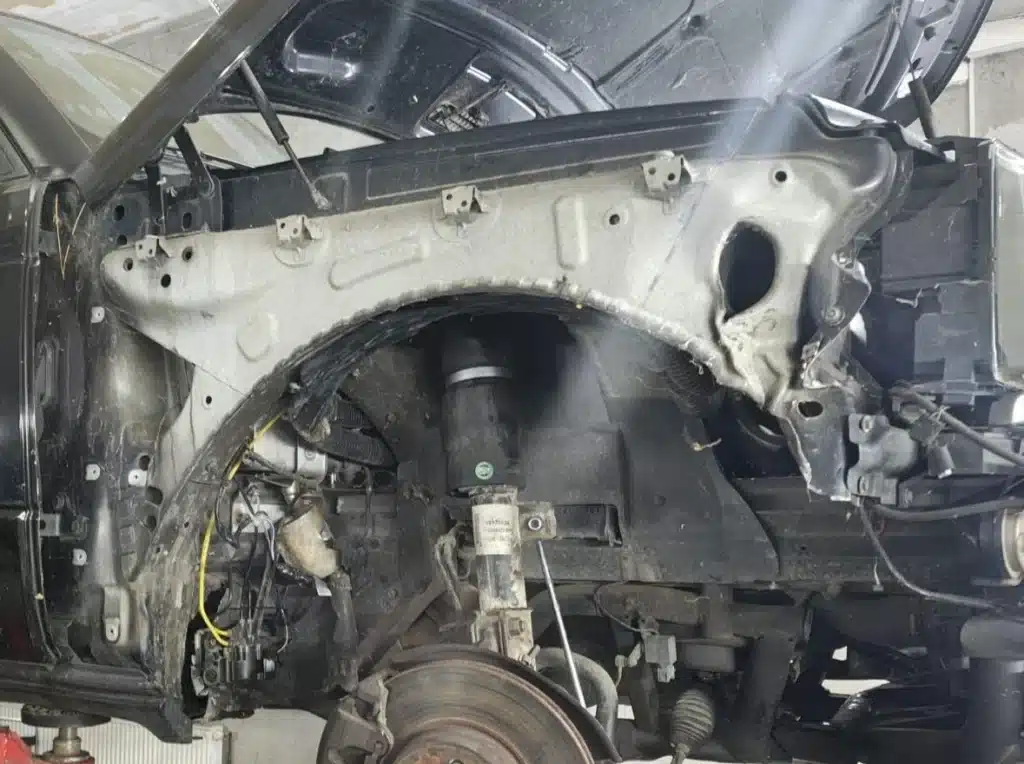
The vehicle and the tool. A 2002 Range Rover L322 with air suspension. We used an X431 ThinkDiag adapter with its phone app. Ivan and I worked on the car together.
Problem 1: air suspension. The car had been hit on the front right wheel, which damaged an air valve in the suspension system. We replaced the valve. After that, the scan listed several faults, including a CAN bus fault and valve faults, and also a front left height sensor fault.
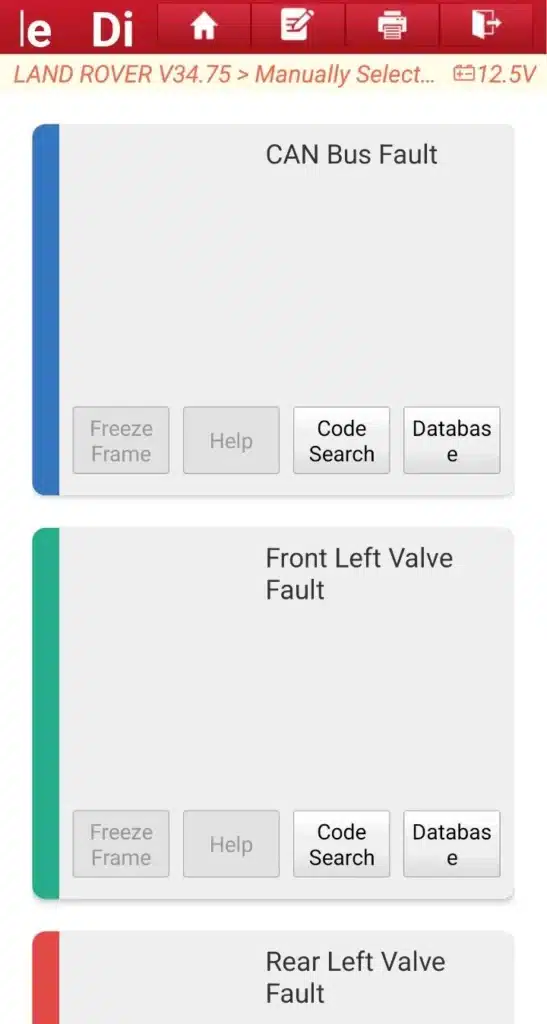
The scan said “height sensor.” The sensor itself was fine. When we checked it, we found the sensor’s lever mounted upside down. This can happen when a vehicle like this is lifted on a hoist, and it’s a reminder to be careful when you lower the car.
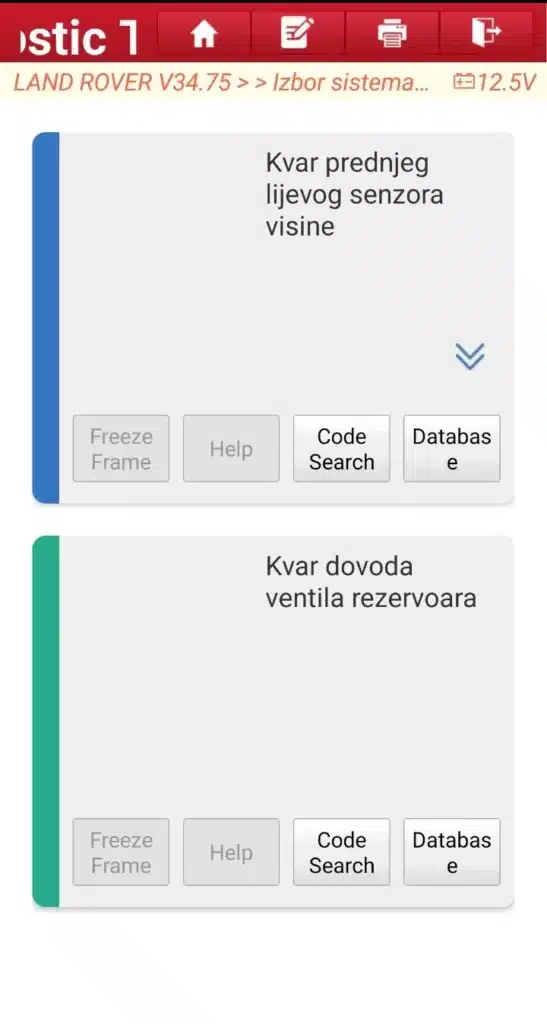
We then looked at live data. All the sensor voltages were normal, which told us the electrical side was fine. But the compressor was filling the air reservoir only to about 9 bar (roughly 130 psi). We replaced a piston ring in the compressor, and the pressure rose to about 11.5 bar (roughly 167 psi). That was better, but still not enough, and the suspension kept dropping to a safe height each time the car was switched off.
The factory figure we worked from is 13.5 to 14 bar (roughly 196 to 203 psi) for filling the reservoir. A new compressor cylinder has been ordered. After it’s installed, we’ll measure the pressure again.
Problem 2: steering wheel and airbag. The same car showed a steering wheel position sensor fault and an airbag fault. The horn and the multimedia buttons on the steering wheel didn’t work either.
When we opened up the steering wheel, we looked at the clock spring, the coiled ribbon cable behind the steering wheel that keeps the airbag and wheel controls connected while the wheel turns. The flat cable inside was torn. That’s what happens when a steering wheel is removed and refitted without setting the clock spring correctly. It has to sit in the center position, with the wheels pointing straight ahead, so the cable has equal room to turn both ways. Before we installed the new one, we checked it by hand: the clock spring should have about 3.5 turns each way from the center position. The service manual for your vehicle has the final word.
After we replaced the clock spring, the horn and steering wheel controls worked, and the airbag warning went off.
What this teaches.
- A scanner shows where to look. In both problems, the fault codes pointed to sensors and the system, but the causes were a lever mounted the wrong way and a torn cable.
- Live data separates electrical problems from mechanical ones. Normal voltages and low pressure told us to stop chasing the sensors and look at the compressor.
- A basic OBD2 code reader won’t see these faults. Air suspension and airbag problems live outside the standard engine and emissions data. You need a scanner and software that can talk to those modules on your specific brand.
- After a repair, check again. Clear the codes, then scan once more to make sure the fault doesn’t return.
A safety note. The clock spring is part of the airbag system. Don’t remove a steering wheel or touch airbag parts unless you know the correct procedure for your vehicle, including how long to wait after disconnecting the battery. If you’re not sure, take it to a shop.
Ivan Tatić, SCG Technical Consultant
“The scanner told us where to look, but it was the inspection that found the real causes. I think that’s the best way to explain what a scanner is: a very good flashlight, not a repair.”
8. Six Functions That Get Mixed Up
Scanner ads throw a lot of words at you. Most of them describe six different things, and people often treat them as one. Knowing the difference saves you money, because each step up costs more and needs more knowledge to use.
1. Reading and clearing codes. The scanner reads the trouble codes stored in the computer and can clear them. Every scanner does this for the engine. Codes have a letter and four numbers, such as P0301. The first letter tells you the area: P for powertrain, B for body, C for chassis and U for network. If you want to learn how to read them, start with OBD2 Codes Explained and then see how some codes are the same on every car while others belong to a single maker in Generic vs. Manufacturer-Specific OBD2 Codes.
2. Live data. The scanner shows what the sensors are reporting right now, such as engine speed, coolant temperature or fuel trim. It helps you catch problems that come and go. Many scanners can also draw the values as a graph. Our article How to Read OBD2 Live Data explains which readings matter. The standard OBD2 services behind all this are explained in The 10 OBD2 Modes Explained.
3. Active tests, also called bidirectional control. Instead of only listening, the scanner sends a command to a part and makes it work. For example, it can turn on a cooling fan or run a fuel pump so you can see whether it responds. We cover this in Section 10.
4. Service functions, also called resets. These are routines that you run after certain maintenance. Common ones include resetting the oil service light, calibrating the steering angle sensor, retracting the electric parking brake for a brake job, and registering a new battery. Not every scanner has them, and the list depends on the car.
5. Coding and adaptation. Coding changes settings in a control module, like turning a feature on or off. Adaptation teaches a module about a new part, like a new throttle body or a new sensor. These are advanced jobs, and they work only on vehicles and modules the scanner supports.
6. Programming. Programming installs new software into a control module. It’s the most demanding of the six. It often needs a laptop, a special interface, the car maker’s software and sometimes a subscription or a login. Many scanners that offer “coding” can’t do this.
A way to remember the ladder: reading is looking, live data is watching, active tests are poking, resets are maintenance, coding is changing a setting, and programming is replacing the software. Each step needs more skill, more risk and more cost than the one before it. Most people stop at the first two or three, and that’s perfectly fine.

Coding, adaptation and programming are not the same thing, even though ads sometimes treat them that way. Our article ECU Coding vs. Programming vs. Adaptation lays out the difference.
| Function | In plain words | Example | Who usually needs it |
|---|---|---|---|
| Read and clear codes | See and erase stored problems | A Check Engine light | Everyone |
| Live data | Watch sensors in real time | Coolant temperature graph | DIYers, anyone chasing a problem |
| Active tests | Command a part to work | Turn on a fan | Serious DIYers, shops |
| Service functions | Run a maintenance routine | Reset the oil light | DIYers who do their own service |
| Coding and adaptation | Change settings or teach a part | Configure a new module | Advanced users, shops |
| Programming | Install new software in a module | Update or replace a computer | Mostly shops |
Ivan Tatić, SCG Technical Consultant
“Most of the customers I talk to want to read a code and maybe reset a service light. They don’t need programming. The thing I see most often is someone paying for features they’ll never use, so I always ask what they actually plan to do before I suggest a tool.”
9. Engine Only, or Every System in the Car?
This is the choice that decides most purchases.
A basic OBD2 scanner reads the engine and emissions system. That’s what the standard requires every maker to share. It does not guarantee that the scanner can read ABS, airbags, the transmission, the body computer or the climate control, even though they are all in the same car.
To reach those, you need a scanner with enhanced or full-system capability. These tools carry extra software for each brand, and the list of systems they can reach changes by maker, model and year.
Here is how to think about it:
- Engine and emissions only. A basic code reader or a simple Bluetooth adapter. Good for Check Engine light questions.
- Engine plus ABS, airbag and transmission. A mid-level scanner. Good if you have a warning light for brakes or airbags, or you want to check the car before you buy it.
- Full-system. Reads most of the modules in the car, often including body, climate, and special systems. Good for DIYers who work on several systems, and for anyone with a brand that has complicated electronics.
The Range Rover in Section 7 is a good example. The faults were in the air suspension and the steering wheel airbag system. A basic code reader would have shown nothing for either. We needed a scanner with software for that vehicle.
The fine print matters here. “Full-system” doesn’t mean it can do everything on every car. Always check the scanner’s coverage list for your make, model and year. Our article What Does Full-System Diagnostics Mean on a Scan Tool? explains how to read those claims.

Ivan Tatić, SCG Technical Consultant
“Older and more complicated cars like air suspension or luxury vehicles are where a basic reader runs out first. If your car has systems like that, I’d go straight to a scanner with full-system support for your brand, and check the coverage list before you buy.”
10. Bidirectional Control: Do You Need It?
With bidirectional control, the scanner doesn’t only listen to the car. It can also tell a part to act. You’re not only asking “what’s wrong?” You’re also saying “turn this part on so I can see if it works.”
Examples:
- Run a cooling fan to see if it spins.
- Cycle a fuel pump or a fuel injector.
- Command an ABS pump to help bleed brakes.
- Retract an electric parking brake before changing the pads.
- Open and close an EVAP valve during a leak test.
It’s a great way to test a part without taking it out. It can save hours when you’re trying to find the cause of a problem, and it can show whether a repair worked.

You probably need it if you do a lot of your own repairs on modern cars, you work on brakes with electric parking brakes, or you chase problems that don’t leave a clear code.
You probably don’t need it if you only want to read Check Engine codes, or you take the car to a shop for anything beyond that.
A safety rule. When you tell a part to run, it runs. Keep your hands, hair and clothes away from fans and belts. Don’t run a test on a car that’s on a jack without proper stands. Don’t run a test unless you know what the command does. Follow the procedure for your vehicle. Bidirectional control is powerful, but it’s also the point where a mistake can hurt you or your car.
Coverage varies by car, system and test. Two scanners that both say “bidirectional” can do very different things. Our article What Is Bidirectional Control on a Scan Tool? explains how to check what a particular tool can do.
Ivan Tatić, SCG Technical Consultant
“I use active tests every day, but I think they’re the most misunderstood feature. They don’t repair anything. They let me check whether a part answers when I ask it to. If you don’t know what you’d do with the result, you probably don’t need to pay for the feature.”
11. Will It Work on Your Car? How to Check Before You Buy
This is where many people get burned. A scanner can look perfect on paper and still not support the thing you need on your car.
There are three layers of compatibility.
Layer 1: Basic OBD2. Almost any scanner works on cars from 1996 on, because the standard requires it. This is the part that’s easy.
Layer 2: Enhanced systems. Reading ABS, airbags, the transmission or the body computer depends on the brand, model and year. A scanner may support these on one car and not on another.
Layer 3: Special functions. Resets, active tests, coding and programming are the most specific. A scanner may offer an oil reset on your car but not a steering angle calibration, and it’s the second one you may need.
Here’s how to check:
- Write down the exact vehicle. Make, model, year, engine and, if you can, the VIN.
- List the functions you need. For example: ABS codes, oil reset, electric parking brake, battery registration.
- Use the maker’s own coverage checker or manual. Most scanner makers have a vehicle coverage tool on their website. A store listing is a starting point, not proof.
- Check function by function. Don’t stop at “supports your brand.” Check “supports this function on this model and year.”
- Read the update terms. Coverage grows with updates, so ask how long updates are included and what happens afterward.

A worked example. Say you own a 2015 pickup. You want to read the ABS codes, reset the oil light and retract the electric parking brake for a brake job.
First, you write down the exact truck: make, model, year and engine. Next, you list the three things you want: ABS codes, an oil reset and the parking brake retract. Then you open the maker’s coverage tool, choose your truck, and look for each of the three, one by one. If the scanner shows ABS codes and the oil reset but doesn’t list the parking brake routine for your truck, it won’t do the whole job, even if the box says “supports your brand.”
That check takes ten minutes. It can save you from returning a scanner and starting over.
Our guide Will Any OBD2 Scanner Work With My Car? goes through this in more detail.
For newer cars. You may see two terms on the box: CAN FD and DoIP. They describe newer ways some recent vehicles send diagnostic data. You don’t need them for older cars. If you work on a newer car that uses them, you do need a scanner that supports them. Our articles CAN FD Explained and DoIP Explained are there when you need them.
Slobodan Dimitrijević
“I read the coverage documents from several scanner makers while preparing this guide. The best ones let you pick your car and see which functions are supported. The weakest ones list a brand name and leave you to guess. When a product page can’t show me function-by-function coverage, I treat the claim as unconfirmed.”
12. Special Cases: Older Cars, Diesels, Hybrids and Heavy Trucks
Most of this guide is about regular gas-powered cars and light trucks from 1996 on. A few vehicles are different, and it’s worth knowing before you buy.
Cars from before 1996. Many earlier cars don’t have OBD2. Some have an older system, often called OBD1, with different plugs and different methods. A standard OBD2 scanner won’t work on them. If you own a classic or an older work truck, check the manual to see what it uses, and look for a tool made for that system.
Diesel cars and trucks. Many modern diesels follow OBD2 rules and a basic scanner can read their codes. But diesels have their own systems, such as particulate filters and exhaust fluid, and special service functions tied to them. If you work on a diesel, check the scanner’s coverage for those functions, not just for the brand.
Hybrids and electric vehicles. These vehicles have an OBD2 port, and a basic scanner can usually read the standard data. The high-voltage battery and the electric drive system, though, are often outside what a basic scanner shows. If you need those, you need a tool with specific support for that vehicle, and you should follow the safety rules for high-voltage systems.
Heavy-duty trucks. Many large trucks use a different connector and a different data standard than a passenger car. A regular OBD2 scanner may not fit or may not read them. If you work on big trucks, look for a tool made for them.
Motorcycles, RVs and equipment. Rules and plugs vary. Some work with a standard scanner, and some need special adapters. Check the vehicle’s manual first.
Imported and luxury cars. The standard engine data is the same, but the extra systems are very brand-specific. These are where a basic reader runs out first and where the coverage list matters most, as the Range Rover in Section 7 showed.
Slobodan Dimitrijević
“When I read through scanner coverage lists, I noticed that the cars that need the most help, such as older luxury cars with air suspension or complicated electronics, are the ones where a product page says the least. Don’t assume. Check your exact vehicle.”
13. How to Read a Product Page Without Getting Fooled
Product pages are written to sell. You can still learn a lot from them if you know what to look for.
“Full system.” This sounds like everything. It usually means “many systems on supported cars.” Look for the list of systems and the list of vehicles.
“Supports all brands” or “100+ brands.” A number of brands doesn’t tell you which systems or functions work on your model. Check your car.
“Thousands of active tests.” A big number can be impressive, but it may count tests across many cars. What matters is how many tests apply to yours. We’ve seen listings that give a big figure while the maker’s own page gives no number at all, so when a number looks unusual, look for it on the manufacturer’s site too.
“Lifetime updates” or “free updates.” Read the fine print. Does it mean free for life, free for a year, or free for one set of brands? Is there a catch for a certain car or function?
“ECU coding” or “ECU programming.” Coding and programming are different, and both depend on the car. If a page says a tool offers one of them, check which brands and models.
“Bidirectional.” Check whether the tool can do the tests you need on your car. Two tools with the same label can do very different things.
Reviews and ratings. Customer reviews can be useful for reading about real problems, but they’re not proof that a function works on your car. We don’t show store ratings on this site for that reason.
Missing information. If a page doesn’t say whether a function works on your car, treat it as not confirmed. Don’t assume it does.
A good habit is to find the same claim in two places: the store page and the manufacturer’s own page or manual. When they agree, you can trust it more. When they don’t, ask the seller.

14. What a Scanner Really Costs
The price on the box is the start of the cost, not the end.
When I looked at how different scanner makers handle updates, the biggest surprises were after the purchase. Think about these costs before you decide.
The tool itself. Prices range from very low for a basic code reader to very high for a professional platform. We don’t list prices in this guide, because they change all the time and an old number can mislead you. Check the current price on the store page.
Software and updates. Some scanners include updates for life. Some include a year and then charge. Some charge for each car brand. Ask three questions: how long are updates included, what do they cost after that, and does the scanner keep working if I stop paying?
Subscriptions. Many professional-grade tools need a subscription to keep adding vehicles and functions. Some budget tools also charge for app features. A low price can turn into a higher total cost if you need a feature behind a paywall.
Extra hardware. Some functions need an adapter, a cable for a specific brand or a separate interface for programming.
Your time. A scanner that’s hard to use, or that doesn’t support your car, costs you hours.
A simple way to compare tools is to add up three years of ownership: the price, the updates and anything else you’ll need. A cheap tool with no updates and a more expensive one with free updates can end up close in total.

Here’s how that can look for three kinds of buyers, without any prices:
- Occasional user. A basic reader with no required updates. The cost is the one-time purchase, and maybe nothing else for years.
- Weekend DIYer. A handheld or tablet with a year or more of updates included. The cost is the purchase plus a decision about whether to renew updates later, or whether the tool keeps working without them.
- Working mechanic. A professional tool with a subscription or paid updates. The subscription is part of the business cost, and the tool only stays useful if you keep it current.
Ask the same question for each: what happens in year two and year three?
We cover this in more depth in OBD2 Scanner Subscriptions Explained and How Much Should You Spend on an OBD2 Scanner?
15. Safety and Worries: Damage, Battery Drain and Airbags
Three worries come up again and again.
Can a scanner damage my car? Reading codes is a passive job. The scanner asks the computer for information. That doesn’t change anything in the car. Problems come from using the wrong function: running a test you don’t understand, coding a module with the wrong settings, or starting a programming job when the battery voltage is low or the connection drops. If you’re only reading codes and live data, the risk is very low. Our article Can an OBD2 Scanner Damage My Car? goes through the details.
Will it drain my battery? A scanner or adapter that stays plugged in draws a small amount of power. If you drive the car regularly, the battery recharges and you won’t notice. If the car sits for weeks, or the battery is already weak, an adapter left in the port can add to the problem. When the car won’t be used for a while, unplug it.
What about airbags? The airbag system is a safety system. Reading airbag codes with a scanner is fine. Taking apart steering wheels, seats or airbag parts is not a casual job. Disconnect the battery and wait the time the manufacturer specifies before working near airbag parts, and follow the procedure for your vehicle. If you’re not sure, go to a shop. Section 7 shows how easy it is to do damage by removing a steering wheel the wrong way.
Ivan Tatić, SCG Technical Consultant
“Reading a code won’t hurt a car. What can hurt it is clearing, coding or testing things you don’t understand, especially on a weak battery. If a job involves airbags or programming, I either know exactly what I’m doing or I don’t touch it.”
16. When the Scanner Won’t Connect
Sooner or later most people see “can’t connect” or “no communication.” It’s usually a short list of causes.
- Power. Does the scanner or adapter light up? If not, check that it’s seated fully in the port, and check the car battery.
- Ignition. Many scanners need the ignition on. Some work best with the engine running. Check the instructions for your tool.
- Phone link (wireless only). Is the phone connected to the adapter? Close other OBD apps, since only one can use the adapter at a time.
- Vehicle support. Does your scanner support your car and system? A scanner can connect to a car and still not support a module.
- All modules or one module. If everything fails, the problem is usually the cable, the port or the power. If only one module fails, the problem is usually that module or its connection.
A useful test is to try the same scanner on another car. If it works there, your car is the problem. If it doesn’t, the scanner is the problem.
Our step-by-step guide is Why Won’t My OBD2 Scanner Connect to My Car?
17. Which Scanner Fits You?
Now you can match what you’ve learned to a real person. Find the one that sounds most like you.
| Who you are | What you need | Type to look at | Our guide |
|---|---|---|---|
| Driver with an occasional Check Engine light | Read and clear engine codes | Basic code reader or simple Bluetooth adapter | Best OBD2 Scanners for Beginners |
| Phone person who likes small and simple | Quick checks and live data on a phone | Bluetooth adapter | Best Bluetooth OBD2 Scanners |
| Someone who wants no phone and no app | Own screen, plug and go | Handheld scan tool | Best Standalone OBD2 Scanners |
| DIY mechanic doing your own repairs | Codes, live data, ABS, airbags, resets | Handheld or tablet with full-system support | Best OBD2 Scanners for DIY Mechanics |
| Warning light for ABS or airbag | Read brake and airbag modules | Scan tool with ABS and SRS support | Best OBD2 Scanners for ABS and SRS |
| Several vehicles or a complicated car | Many systems across brands | Full-system scanner | Best Full-System Automotive Scanners |
| Serious DIYer who tests parts | Active tests and service functions | Bidirectional scan tool | Best Bidirectional Scan Tools and 7 Bidirectional Scan Tools Compared |
| Shop or professional | Broad coverage, speed, advanced functions | Professional platform | Best Professional Automotive Scan Tools |
| Watching the budget | The most capability for the least money | Depends on the job | Under $100, Under $200 and Under $500 |
| Don’t want ongoing fees | No required subscription | Check the update terms | Best OBD2 Scanners With No Subscription |
Our rules for choosing. These are the rules Ivan and I use when someone asks us what to buy.
- Buy for the job you actually have. Don’t buy for the job you might have someday.
- Check your exact car and your exact function before you pay.
- Pay for updates only if you’ll use them.
- Pick the simplest tool that does the job. A tool you understand beats a tool with more buttons.
- If a job involves airbags, programming or safety systems and you aren’t sure, use a shop.
Ivan Tatić and Slobodan Dimitrijević
“We both start with the same question: what do you want to do with the scanner? If the answer is ‘read the Check Engine light,’ a simple tool is the right tool. If the answer is ‘work on brakes, airbags and suspension,’ you need more. The mistake we see is buying a big tool for a small job.”
18. Seven Common Mistakes
1. Assuming “OBD2 compatible” means everything works. It means the basic standard works. Enhanced systems and functions are separate questions.
2. Choosing by the number of features. A long list sounds impressive. What matters is whether the features you need work on your car.
3. Checking the brand but not the function. “Supports your brand” doesn’t mean it supports your function on your model and year.
4. Mixing up full-system and bidirectional. Reading more systems and testing parts are two different abilities.
5. Mixing up coding and programming. Coding changes settings. Programming installs software. They’re not the same, and the second one is much harder.
6. Ignoring software and subscription costs. The price on the box isn’t the whole cost.
7. Buying for specifications, not for your real use. The best tool is the one that does your job, not the one with the longest spec sheet.
Ivan Tatić, SCG Technical Consultant
“The mistake I see most is clearing codes right away and then forgetting what they were. The second most common is believing a code is a part number. It’s a clue.”
19. Your Pre-Purchase Checklist
Run through this before you click Buy.
- Vehicle: I know the exact make, model, year and engine.
- Systems: I know whether I need only the engine, or also ABS, airbags, transmission and body.
- Functions: I know whether I need codes, live data, resets, active tests or coding.
- Coverage: I checked the maker’s coverage list for my car and my function.
- Connection: I know if I want a phone, a cable or a laptop, and what it needs.
- Updates: I know how long updates are included and what happens afterward.
- Total cost: I added up the price, updates and extras for three years.
- Support: I know how to get help if it doesn’t work.
20. After You Buy: Your First Scan and What to Do With the Code
Your first scan. Park the car, turn the ignition on (many tools also want the engine running, so check your instructions), plug in the scanner, let it connect and read the codes. Write down every code and any freeze frame data before you clear anything. Our step-by-step article How to Use an OBD2 Scanner walks through it.
What to do with a code. Treat it as a clue. Look up what the code means, inspect the obvious things first, such as loose connectors, damaged wires and vacuum hoses, and test before you replace parts. Clear the code only after you’ve saved the information, and then check that the problem doesn’t return. If it does, the repair isn’t finished. Our article What to Do After Your OBD2 Scanner Finds a Trouble Code gives a full workflow.
How to keep a record. Keep a simple note for every scan: the date, the mileage, the codes and their status (stored, pending or permanent), any freeze frame data, and what you did about it. A note on your phone is enough. If a problem comes back months later, the record shows you what happened before. If you take the car to a shop, it also saves time, because you can show them what the car reported.
Scan on a schedule. You don’t need to scan every week. A scan before a long trip, before buying a used car, and after any repair is a good habit. If you notice a change in how the car drives, scan then too.
When to stop. If the job involves airbags, brakes you aren’t confident with, or anything that could injure you or leave the car unsafe, stop and use a shop. A scanner gives you information. It doesn’t replace the skills to act on it safely.
Frequently Asked Questions
What should I look for when buying an OBD2 scanner?
Start with your exact car and the job you need done. Then check which systems and functions the scanner supports on that car, how it connects, and what updates cost. Price and brand come after that.
Will any OBD2 scanner work on my car?
Most work on cars from 1996 on for basic engine and emissions data. Reading ABS, airbags, the transmission or doing resets depends on the scanner, the brand and the model year. Check the maker’s coverage list.
Is a cheap OBD2 scanner enough?
It can be, if all you want is to read and clear engine codes. If you need ABS, airbags or service resets, a very basic reader probably won’t do it.
Do I need a full-system scanner?
You need one if you want to read systems beyond the engine, such as ABS, airbags or the transmission. If you only want to check the Check Engine light, you don’t.
Do I need a bidirectional scanner?
Only if you plan to test parts or run service routines that need commands sent to the car. For reading codes alone, you don’t. Coverage varies by car and test.
Is Bluetooth or a handheld better?
Neither is better in every case. Bluetooth is small and convenient and uses your phone as the screen. A handheld has its own screen and doesn’t depend on a phone. Choose based on how you work.
Does an OBD2 scanner need batteries?
Most don’t. They get power from the car through the OBD2 port. Tablet-style scanners usually have their own rechargeable battery.
Do I need the internet to use a scanner?
Often only for updates, activation or some apps. Basic reading usually works without it. Check the instructions for your tool.
Can a scanner damage my car?
Reading codes and live data is very low risk. Risk comes from coding, programming or running tests you don’t understand, especially on a weak battery.
Can I leave a scanner plugged in?
A small adapter uses little power, but if the car sits for weeks or the battery is weak, unplug it.
Do OBD2 scanners need subscriptions?
Some do and some don’t. Check how long updates are included and what they cost afterward before you buy.
Is coding the same as programming?
No. Coding changes settings in a module. Programming installs new software in it. Programming is more demanding and often needs extra hardware and software.
Will clearing a code fix the problem?
No. Clearing a code only erases the message and turns off the light. If the cause is still there, the code will come back. Save the information first, fix the cause, then clear the code and check again.
Do I need the engine running to scan?
It depends on the tool and the job. Many scanners need the ignition on, and some work better with the engine running. Check the instructions for your scanner and follow them for your car.
How often should I scan my car?
There’s no fixed schedule. Scan when a warning light comes on, before a long trip, before buying a used car and after a repair. If the car behaves differently, scan then too.
Can a scanner tell me if a used car is safe to buy?
It can show stored codes and whether the emissions monitors are ready, which is useful. But it can’t see everything. A scan doesn’t replace a test drive and an inspection by a mechanic.
What if my car is older than 1996?
Most cars before 1996 don’t use OBD2, so a standard OBD2 scanner won’t work. Check the manual for what your car uses and look for a tool made for that system.
Where to Go Next
If you’d like us to narrow the choice for your car and your needs, use our Scanner Finder.
If you drive one of these, our vehicle guides apply this process to your exact make: BMW, Chevrolet, Ford F-150, Toyota Tundra and Mercedes-Benz.
For Ford cars, crossovers and SUVs, read our best OBD2 scanners for Ford guide. To see how we check our facts, read How SCG Evaluates OBD2 Scanners.
The Bottom Line
Start with your car. Then decide what you want the scanner to do. Check that it supports that function on your exact vehicle. Only then compare the type, the connection, the updates and the price.
Don’t buy the scanner with the most features. Buy the one that does the jobs you need on the cars you actually work on.
Sources and How We Checked
The facts about OBD2 requirements come from the U.S. Environmental Protection Agency: its fact sheet on on-board diagnostics and its 1996 Federal Register notice on OBD II requirements, both linked above. Information about the connector and standard services comes from the published SAE standards that define them. Statements about scanner coverage and features come from the scanner makers’ own documentation, which we compared for this guide. The Range Rover example describes work that Slobodan and Ivan did themselves.