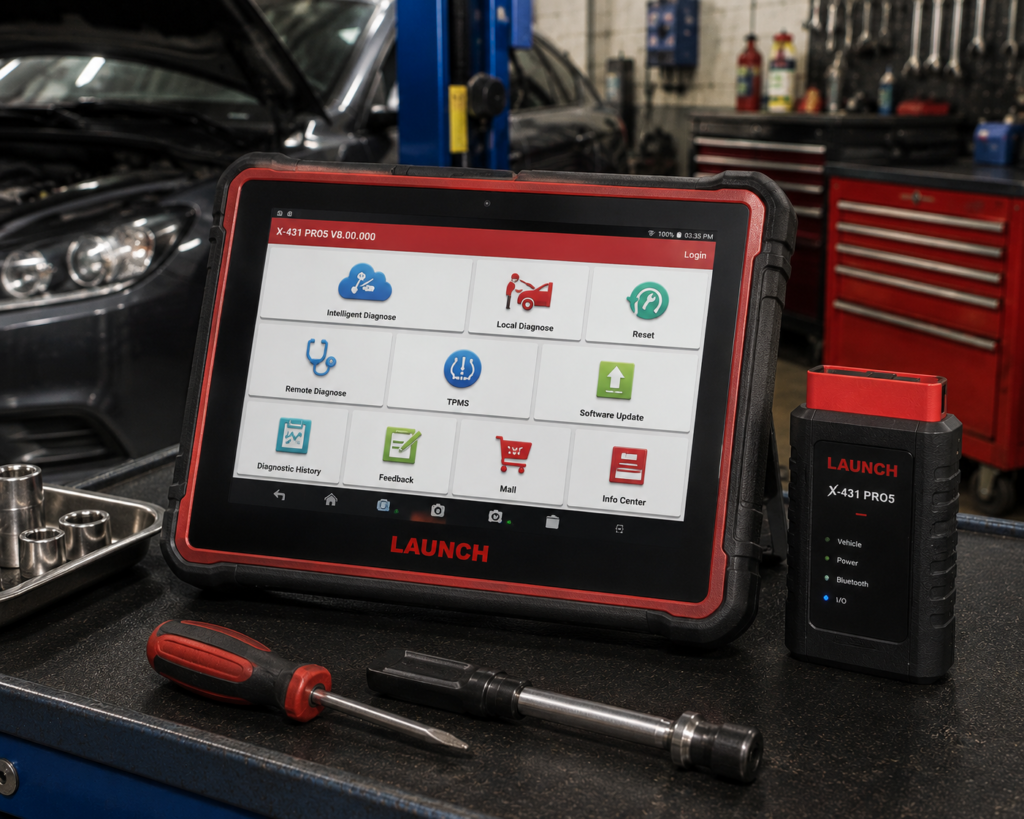
The LAUNCH X431 PRO5 is a 10.1 inch Android tablet that works with a Launch interface called the SmartLink C. It reads and clears codes on all systems, runs active tests, lists a long set of service functions and adds online coding on named brands, topology mapping and a J2534 pass-through interface that talks to a Windows PC. Amazon lists online coding for BMW, Mercedes-Benz, Porsche, VW, Skoda and Seat and puts “60+ Services” in the title. Launch’s own US site has no live page for this model, so most of what we can confirm comes from Amazon and from Launch’s pages on the accessory that adds key and module work, the X-PROG3.
The short version: the PRO5 is a workshop tablet for a technician who codes European cars, wants J2534 hardware in the box and may add key programming later. Module-level key and immobilizer work needs the separate X-PROG3, which Launch sells on its own. Amazon is the only source that describes this exact listing in detail, so this review says where a claim rests on Amazon alone. The name PRO5 has also covered more than one generation, and Launch’s Europe sheet for an earlier X-431 EURO PRO5 describes different hardware than the Amazon listing, so confirm the listing title before you buy.
Affiliate Disclosure: As an Amazon Associate I earn from qualifying purchases. Scan Choice Guide is a participant in the Amazon Services LLC Associates Program, an affiliate advertising program designed to provide a means for sites to earn advertising fees by advertising and linking to Amazon.com.
What Is in the Box and What the Hardware Is
Amazon’s detail table lists the display tablet, one VCI connector, an OBD II extension cable, a password envelope, two power adaptors, a charging cable, a Type A to Type B USB cable, and several optional items: a cigarette lighter cable, battery clamp cables, an OBD I adaptor box and a non-16-pin adaptor cable kit. The power source line reads “7000mAh Battery Powered; Come with a SmartLink C V2.0; 25 Free Languages”. The shipping dimensions are 10.5 by 7.5 by 1.3 inches and the listed shipping weight is 17.6 pounds, which describes the boxed kit.
The bullets name the connector as a SmartLink C 2.0 device of the J2534 standard that pairs with a PC to download the maker’s software and update the ECU. Amazon’s warm notice adds that the J2534 tool is compatible only with Windows-based computers. That one sentence decides whether the PRO5 suits a Mac-only shop.
The picture below shows a door lock actuator test on a Toyota Tacoma, one of the active tests the tablet sends to the car’s modules.

Two Generations Under One Name
Launch has sold more than one tablet called PRO5, and a buyer who searches the web will meet all of them. Launch Europe’s presentation of the X-431 EURO PRO5, dated July 2020, describes a 10.1 inch 1920 by 1200 screen, Android 9.0, a 1.8 GHz eight-core processor, 4 GB of memory, 64 GB of storage plus a 32 GB card, a 7000 milliamp-hour battery, Wi-Fi on 2.4 and 5 GHz and a small Bluetooth connector of 69 by 40 by 18 millimeters. The Amazon listing in this review says Android 10.0 and a SmartLink C 2.0 interface with J2534, DoIP and CAN FD. Both share a battery figure of 7000 milliamp-hours.
That is useful for one reason: it settles a figure that earlier versions of this review left open. Reseller pages disagreed on 6,300 and 7,000 milliamp-hours. Amazon’s own listing says 7000mAh, and Launch Europe’s sheet for the earlier model says the same, so we use 7000. The processor, screen resolution and memory of the current SmartLink version are not stated by Amazon in the bullets, and we do not state them either.
Amazon also shows a “Newer Version Available” line pointing to the LAUNCH X431 PRO3 (V+ V5.0), which it describes as a 10.1 inch tablet with ECU coding, AutoAuth for FCA and 55 or more services. The listing therefore tells you itself that Launch has a newer model in this family. If you want the current generation, compare the two listings.
What Amazon Says vs. What Launch Confirms
Launch’s own US site, launchtechusa.com, had no live PRO5 page when we checked, and Launch’s global pages for the model returned server errors earlier in this research. We therefore compared the Amazon listing with the Launch pages that do exist: the X-PROG3 accessory page and the Launch Europe sheet for the earlier EURO PRO5. Where Launch has no statement, the table says so.
| Claim | Amazon listing | Launch | Our reading |
|---|---|---|---|
| Name | “LAUNCH X431 PRO5 Car Scanner… SmartLink C 2.0” | Earlier “X-431 EURO PRO5” on Launch Europe’s sheet | Different generations; check the title |
| Screen | Not stated in the bullets | EURO PRO5: 10.1 inch, 1920 x 1200 | 10.1 inch is safe; the resolution of the current unit is not stated |
| Operating system | Android 10.0 in the title | EURO PRO5: Android 9.0 | The listing is a newer generation |
| Battery | 7000mAh | EURO PRO5: 7000 mAh | Agree |
| Interface | SmartLink C 2.0, J2534, DoIP, CAN FD | EURO PRO5: small Bluetooth connector | The current kit uses SmartLink C |
| Service functions | “60+ Services” | No current page | Amazon’s count; resellers say closer to 50 |
| ECU coding | Online for BMW, Benz, Porsche, VW, Skoda, Seat; online matching for VW and Audi | No current page | Amazon only |
| FCA gateway | “AutoAuth for FCA SGW (2018 later)” | No current page | Amazon only |
| Heavy-duty trucks | “Heavy-duty Truck Diagnostics” | EURO PRO5: optional HD module | Amazon lists it; the earlier model sold it as an option |
| ADAS | Not listed | EURO PRO5 sheet: ADAS function with Launch ADAS Pro | Needs Launch’s separate ADAS equipment |
| Key and module programming | Not listed for the tablet | X-PROG3 page: key programming, ECU read and write, immobilizer | Separate accessory |
| Updates | “2-Year Free Update”, “5-year backup” | No current page | Amazon only |
| Languages | “25 Free Languages” | No current page | Amazon only |
| Computer for J2534 | Windows-based computers only | No current page | Amazon only |
The accessory point matters most. Launch’s X-PROG3 page calls it an advanced all-in-one immobilizer and key programmer for European, Asian and domestic vehicles. It says the tool can retrieve, read, erase and write most ECUs without removing the ECU hardware, that it adds new or replacement keys, and that it reads CAS4 and FEM chips and engine ISN codes. It says the X-PROG3 is compatible with X-431 diagnostic scanners without the need to bind. That sentence is why one X-PROG3 can serve more than one Launch tablet. Cloning an ECU or transmission module through a PC needs the separate X-PROG3 PC adapter.
The J2534 point is easy to misread. Amazon’s title says “J2534 Programming Tool”, and a buyer skimming the listing may read module programming into it. J2534 is the pass-through interface that lets a PC run the maker’s own software through the SmartLink C. It is not the same as the key and chip work that the X-PROG3 adds, and neither is the same as the online coding the tablet does for the named brands.
The count point matters least. Amazon says 60 or more services, resellers describe nearer to 50, and no Launch page for this model states a number. Treat 50 to 60 as a range and check your own service.
A third source. The Equipment and Tool Institute, a trade group of scan tool makers, publishes the rules behind the FCA gateway that Amazon says the PRO5 supports. In its Security Gateway Module FAQ, the Institute explains that the gateway was added to most 2018 and later FCA vehicles as a cybersecurity measure, that registration with AutoAuth is a one-time step, that the number of vehicles you can then service is unlimited and that there is a yearly fee for the user or the shop. It adds that once the gateway is unlocked, the aftermarket tool has the same capabilities as on a vehicle without it. This source is independent of both Amazon and Launch. It explains why an AutoAuth line on a listing is a promise about the tool’s ability to sign in, and your own account and fee are separate steps.
How we handle these differences. The feature table at the bottom of this page, the Scanner Finder and our comparisons follow the Amazon listing, because Amazon is where you buy. We name the points above so you can see where Launch says something different or says nothing. If one of them matters to you, read this section before you decide.
J2534, Online Coding and Key Work: Three Different Things
These terms are blurred on the listing, so here they are apart.
- Online coding. The tablet itself connects to a server and changes settings in a module for named brands. Amazon’s examples are recoding adaptive data after an ECU replacement, deactivating auto start-stop, changing interior lights, and data backup. This is the PRO5’s own function.
- J2534 pass-through. The SmartLink C 2.0 pairs with a Windows PC so you can download the maker’s software and update the ECU. The software and its subscription come from the maker, not from Launch.
- Key and module-level work. Reading and writing a module’s memory, programming keys and reading immobilizer data. That is the X-PROG3’s job, sold separately.
For a shop the question is which of the three it sells. A European independent that changes comfort settings and retrofits features uses the first. A shop that reflashes modules with maker software uses the second. A locksmith or key specialist uses the third.
Is the PRO5 Enough for You?
| If your work is | Does the PRO5 list it? |
|---|---|
| Reading and clearing codes on all systems | Yes |
| Active tests on parts | Yes |
| Oil, EPB, SAS, ABS bleeding and similar resets | Yes, per Amazon |
| Online coding on BMW, Mercedes-Benz, Porsche, VW, Skoda, Seat | Yes, per Amazon |
| VAG guided functions | Yes, per Amazon |
| J2534 pass-through with a Windows PC | Yes, through the SmartLink C 2.0 |
| DoIP and CAN FD | Yes, per Amazon |
| FCA gateway access | Yes, per Amazon; needs your own AutoAuth account |
| Topology mapping | Yes, per Amazon |
| Key programming and ECU read or write | Not with the tablet alone; needs the X-PROG3 |
| ADAS calibration | Not listed for this listing |
For a European-leaning shop, the top half covers a working week. The bottom half is accessory territory.
Will the PRO5 Work on Your Car?
Amazon says the software covers 99 percent of post-1996 vehicles and adds a warning that diagnostic functions vary by make, model and year. The coding list is narrower: BMW, Mercedes-Benz, Porsche, VW, Skoda and Seat online, with matching for VW and Audi. Amazon also names Benz data backup and restoration, Benz SCN and variant functions, and BMW data up to March 2022. If your car is outside those brands, treat coding as not listed for it. Our Scanner Finder gives a recommendation for your exact year, make and model.
Your First Hour With the PRO5
Launch has no manual on its US site for this exact model, so these steps follow Launch’s X-431 PRO manual that we used for the PROS V5.0 review, and your screens may differ.
- Charge and connect to Wi-Fi. Charge the tablet fully, switch it on and connect to a Wi-Fi network. You need internet for registration, downloads and the VIN lookup.
- Register. Open the X-431 app, tap Login, choose New Registration and fill in the required fields. The app asks for the serial number and activation code, which are on the card in the password envelope that Amazon lists in the box. Keep the envelope.
- Download the software. Accept the offer to download the diagnostic software and tap Update. It takes several minutes, so keep Wi-Fi on.
- Connect to the car. Plug the connector in with the ignition off, then turn the ignition on and pair it from the tablet.
- Identify the car. Use Intelligent Diagnose to read the VIN, or Local Diagnose to pick the brand, model and year by hand.
- Scan and read. Run the health report, open a system, read the fault codes with freeze frame and watch the data stream.
- For J2534 work, install the SmartLink C 2.0 driver on a Windows computer. Amazon says to contact the seller if the driver download from Launch’s site fails.
Buying a Tablet That Has No Live Manufacturer Page
The PRO5 is the one tablet in our reviews where the manufacturer’s own US site gave us nothing to compare the Amazon listing against. That does not make it a bad tool. It does change how a careful buyer should shop, and the same method works for any listing that rests mostly on the seller’s words.
- Read the title as a specification. This listing’s title names SmartLink C 2.0, Android 10.0, J2534, topology mapping, ECU coding, FCA SGW, 60 or more services, a two-year update and CAN FD with DoIP. Anything the title does not name, such as ADAS or key programming, should be treated as not included.
- Match the generation. Launch Europe’s 2020 sheet shows that the name PRO5 once meant a different Android version and a small Bluetooth connector. Ask the seller in writing for the interface name, the Android version and the model year of the unit.
- Ask for the one thing you are buying it for. If it is online coding on a specific BMW chassis, send the VIN and ask for a written yes. Amazon itself invites this, because it says diagnostic functions vary by make, model and year and asks buyers to contact the seller to check compatibility.
- Check the return and warranty terms of the seller. Amazon lists “2 Years Free Update” as the warranty description. That describes updates, and the hardware warranty is the seller’s to state. Ask who honors it.
- Look at the newer model. The same page points to a newer LAUNCH X431 PRO3 (V+ V5.0). A tablet that Amazon already labels as having a newer version deserves a second look at the newer listing before you commit.
This is not a criticism of Launch’s tablets. Our reviews of the PRO3S+ Elite and the PROS V5.0 had live Launch pages to check against and could say more about what is confirmed. For the PRO5, the honest summary is that the capability list is plausible and consistent with those sister models, and that the proof sits with the seller.
The Launch Tablet That Fits Your Shop
Launch sells several tablets that look alike on a shelf, and a shop owner can lose an afternoon comparing them. This is the short walk-through we use, with every fact taken from our own reviews of each model.
- You mostly diagnose and reset, with some coding on VW-group cars and a wireless connector. The seven-inch CRP919EBT is the smaller step. It lists online coding for VW, Audi, Skoda and Seat, offline coding for several more brands, CAN FD, DoIP and a five-year warranty on Launch’s page.
- You want a larger diagnostic tablet with CAN FD and DoIP but not the coding. The PROS V5.0 lists bidirectional control and 37 special functions, with a coding line that Amazon and Launch disagree about.
- You code BMW and Mercedes-Benz and want J2534 hardware in the box. That is the PRO5, and key work needs the X-PROG3.
- You code Nissan, Toyota, Hyundai and Kia, or reflash six named brands through J2534. That is the PRO3S+ Elite, the one Launch tablet whose J2534 brand list we could check on Launch’s own page.
- You want offline component matching on a wired 8 inch tablet. The PRO Elite does that and lists no online coding or programming.
The PRO5 sits between the PROS V5.0 and the PRO3S+ Elite on capability. It gives you online coding that the PROS V5.0 may not have, and it gives you a J2534 interface without the brand-by-brand confirmation that the PRO3S+ Elite has on Launch’s page.
A Practical Delivery-Day Check
Whatever you decide, the first day with a tablet that rests on a seller’s description should include a short check, so that problems surface while the return window is open.
- Open the About screen and note the Android version, the serial number and the model name. Compare them with the listing title.
- Find the activation card in the password envelope. If the envelope is missing, ask the seller at once, because registration depends on it.
- Download the diagnostic software on Wi-Fi and note how long it takes.
- Connect to a car you know, run the health report and compare the module list with what you expect.
- If J2534 matters, install the SmartLink C 2.0 driver on your Windows PC the same day. Amazon warns that the driver download from Launch’s site can fail, and asks buyers to contact the seller if it does.
- Run one coding change you can undo, such as a comfort setting, and write the original value down first.
If all six steps work, the tablet is the one the listing describes. If one fails, you have your answer while you can still send it back.
Remote Diagnostics, Reports and Support
Amazon’s last feature bullet lists a group of support features: VAG guided functions, AutoAuth FCA access, diagnostic report sharing and remote diagnostics, meant to help with security access codes and channel numbers. The bullet adds that the scanner comes with a two-year update period and a five-year backup, and asks buyers to mail the seller diagnostic reports for professional instruction. The Launch Europe sheet for the earlier EURO PRO5 describes related ideas in its own words: a diagnostic report that shows the status of each ECU and can be saved as a screenshot or a PDF, a data stream viewer with the actual value next to the standard range and a data recording option, and a guided diagnosis function powered by an electronics database.
For a shop these are small things that add up. A saved report before the repair and another after it is the cheapest way to show a customer that a fault is gone. A report that can be shared helps when a second technician or the seller’s support team needs to look at the same car. Remote diagnosis only works if the other person is on a compatible tool, so treat it as a bonus and not a reason to buy. The seller’s support promise is the seller’s, and it is worth testing once in the first week by sending one real question and noting how long the answer takes.
Common Mistakes and Three Simple Plans
- Reading J2534 as key programming. The pass-through interface and the X-PROG3 are separate things.
- Buying the wrong generation. Check that the title says SmartLink C 2.0 and Android 10.0.
- Expecting J2534 on a Mac. Amazon says Windows computers only.
- Starting coding on a weak battery. Put a charger on the car first.
- Assuming a count is a promise. The 60 services figure is Amazon’s.
Plan A: A comfort change on a BMW
- Connect the SmartLink C and identify the car.
- Open the coding function in the system menu.
- Change one setting, test it and save the report.
Plan B: A reflash with the maker’s software
- Install the SmartLink C 2.0 driver on a Windows PC.
- Put a battery maintainer on the car.
- Run the maker’s software through the SmartLink C and follow its steps.
Plan C: Adding key work later
- Start with the tablet alone.
- When a key job comes in, add the X-PROG3 and, for ECU cloning, its PC adapter.
- Check Launch’s page for the vehicle first.
How the PRO5 Compares With Other Tablets in Our Reviews
| LAUNCH PRO5 | LAUNCH PRO3S+ Elite | LAUNCH PROS V5.0 | Autel MaxiSys Ultra | |
|---|---|---|---|---|
| J2534 hardware | Yes, SmartLink C 2.0 | Yes, confirmed for six brands per Launch | Not listed | Yes, VCMI |
| Online coding | BMW, Mercedes, Porsche, VW group | Nissan, Toyota, Hyundai, Kia, Porsche | Disputed between Amazon and Launch | Many brands |
| Key and module work | Needs X-PROG3 | Not listed | Needs X-PROG3 | Programming on specific BMW and Mercedes |
| Topology mapping | Yes, per Amazon | Yes | Not listed | Yes |
Our LAUNCH PRO3S+ Elite review covers the tablet with J2534 confirmed for named brands. Our LAUNCH PROS V5.0 review covers the diagnostic tablet with a disputed coding line. Our Autel MaxiSys Ultra review covers the tablet with the measurement box. The three-way page is our LAUNCH PRO5 vs PRO3S+ Elite vs PROS V5.0 comparison.
Who This Scanner Actually Fits
The PRO5 fits a shop or technician who codes European cars, wants a J2534 interface in the box and is ready to buy the X-PROG3 only when key work appears. It fits a shop that already owns an X-PROG3 for another bay tool, because Launch says the accessory is not bound to one tablet. It does not fit a shop that needs module programming from day one in a single box, a Mac-only office, or a buyer who needs Launch’s own documentation for every count.
Important Limitations of the LAUNCH X431 PRO5
- No live Launch page for this model. Most details are Amazon’s.
- Key and module programming needs the X-PROG3, sold separately.
- J2534 works only with a Windows PC, per Amazon.
- More than one generation uses the name. Check the title.
- The service count is a range. Amazon says 60 or more, resellers about 50.
- ADAS needs Launch’s separate equipment.
Who Should Choose It, and What to Consider Instead
Choose the PRO5 if you want online coding on BMW, Mercedes-Benz and the VW group with J2534 hardware in the box and you will add the X-PROG3 only when key work comes up.
Consider the Autel MaxiSys Ultra instead if you want programming on specific BMW and Mercedes-Benz models and a measurement box built in.
Consider the XTOOL D8W instead if module installation for Ford, Lincoln and Mazda is the need.
Consider the LAUNCH X431 PRO3S+ Elite instead if you need J2534 confirmed for named brands and Asian coding.
Consider the LAUNCH X431 PRO Elite instead if you do not need module programming at all.
| Specification | Details |
|---|---|
| Screen | 10.1 inch |
| System | Android 10.0 per the Amazon title |
| Battery | 7000 mAh per Amazon (and the earlier EURO PRO5 sheet) |
| Interface | SmartLink C 2.0, J2534, DoIP, CAN FD |
| Bidirectional control | Yes |
| Online ECU coding | BMW, Mercedes-Benz, Porsche, VW, Skoda, Seat, per Amazon |
| Key and module programming | Not in the base unit; X-PROG3 accessory |
| Services | 60 or more per Amazon, about 50 per resellers |
| FCA gateway | AutoAuth, 2018 and newer, per Amazon |
| Updates | Two free years per Amazon |
| Pros | Cons |
|---|---|
| Online coding on named European brands | Key and module programming needs the X-PROG3 |
| J2534 SmartLink C 2.0 in the box | J2534 works only with Windows PCs |
| CAN FD, DoIP, topology mapping and FCA AutoAuth listed | No live Launch page; counts rest on Amazon |
| Two free update years per Amazon | More than one generation shares the name |
The picture below shows the real-time data stream on the same Tacoma. Live data is the first thing you open when a coding job does not behave.

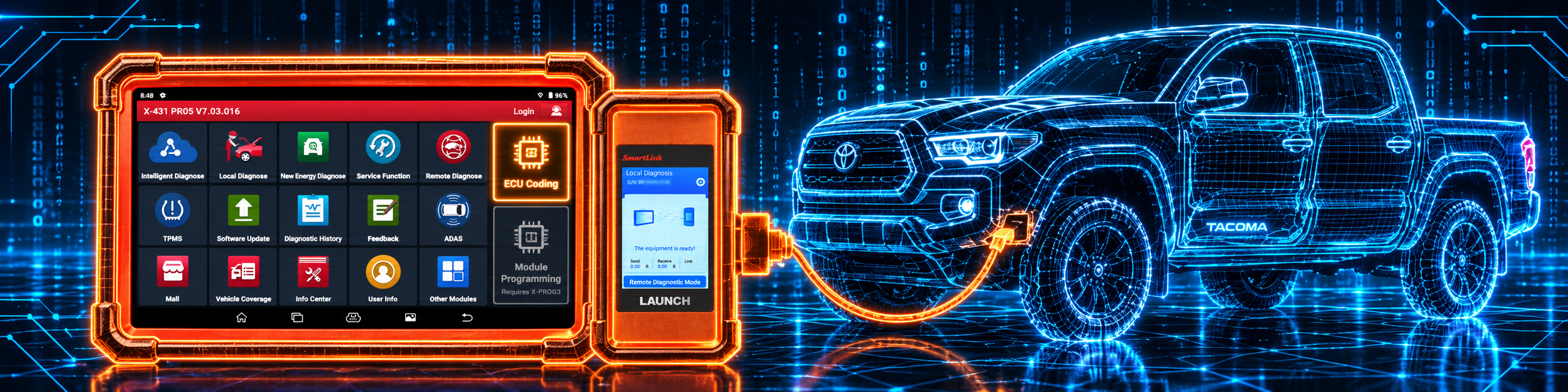
The picture below shows the coding screen with a reminder that module programming is a separate accessory.
Methodology: How SCG Evaluates OBD2 Scanners.
Our Verdict on the LAUNCH X431 PRO5
The PRO5 is a workshop tablet with online coding on named European brands and J2534 hardware in the box. Amazon describes it in detail, Launch’s pages on the accessory confirm the key and module side, and no live Launch page confirms the tablet itself. If you want coding and a pass-through interface and will buy the X-PROG3 only when key work appears, it fits. If you need everything in one box from day one, or a Mac, look elsewhere.
Frequently Asked Questions
Does the LAUNCH X431 PRO5 include module programming?
Not as a base capability. Launch sells the X-PROG3 separately for key programming, ECU read and write and immobilizer work.
What does “J2534 Programming Tool” on the listing mean?
It refers to the SmartLink C 2.0 interface that pairs with a Windows PC to run the maker’s own software. It is not the same as the X-PROG3’s key and chip work.
Which brands can it code online?
Amazon names BMW, Mercedes-Benz, Porsche, VW, Skoda and Seat, with online matching for VW and Audi.
Does it work with a Mac for J2534?
Amazon says the J2534 tool works with Windows-based computers only.
How many services does it have?
Amazon says 60 or more. Resellers describe about 50, and Launch has no page for this model.
What is the battery size?
7000 mAh per Amazon, the same figure as Launch Europe’s sheet for the earlier EURO PRO5.
Is there a newer model?
Amazon’s page shows a newer version, the LAUNCH X431 PRO3 (V+ V5.0). Compare the two listings.
Does it support remote diagnostics and report sharing?
Amazon lists diagnostic report sharing and remote diagnostics among its support features. Remote diagnosis needs the other person on a compatible tool.
Can I buy it as a single kit with key programming?
Not from the base listing. The X-PROG3 is a separate Launch accessory, and cloning an ECU through a PC also needs its PC adapter.
Is it compatible with my specific vehicle?
Use the Scanner Finder to check your year, make and model, and check the coding list for your brand.
Trusted Sources
- Launch Tech USA X-PROG 3 page: key programming, ECU read and write, compatibility with X-431 tablets
- Launch Europe X-431 EURO PRO5 presentation, July 2020: hardware of the earlier generation, battery, ADAS and HD options
- Amazon listing for the LAUNCH X431 PRO5 (ASIN B07L6WWL62): title, bullets, description and details checked 2026-10-14
- Equipment and Tool Institute, Security Gateway Module FAQ: FCA gateway and AutoAuth registration
- Reseller listings (obdii365.com, x431tool.com, launch-tool.com): used only for the service count and battery range, because Launch has no live PRO5 page