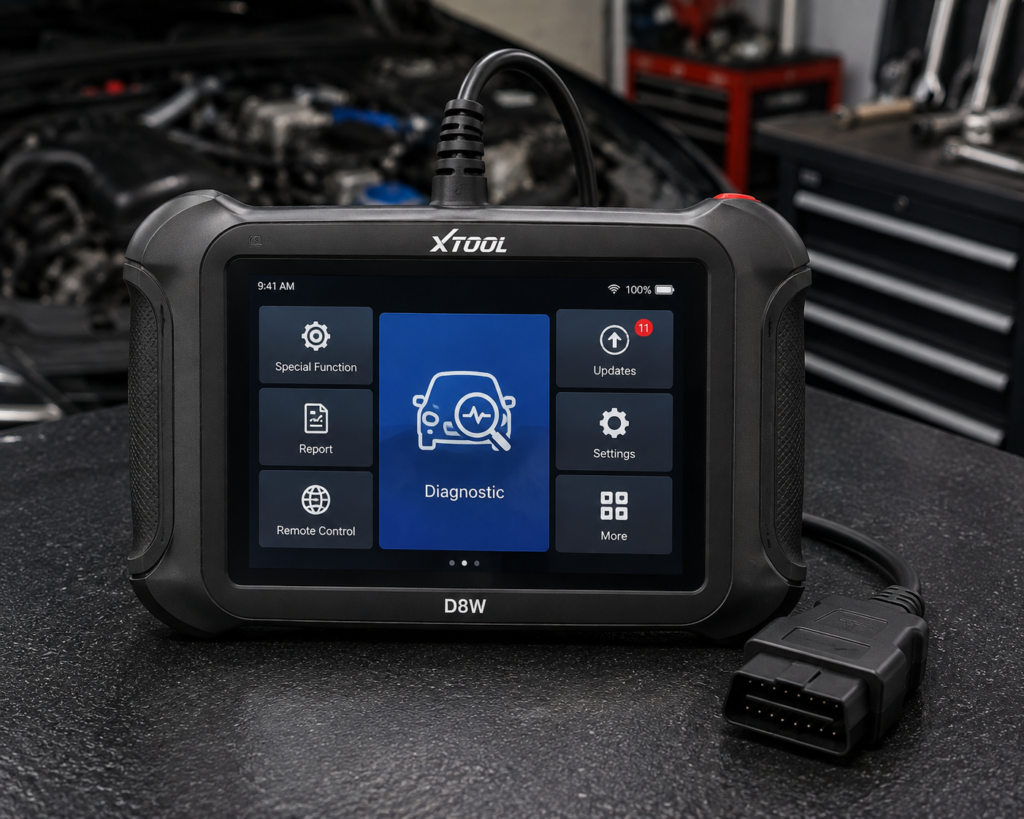
The XTOOL D8W is an 8 inch Android tablet that works with a Wi-Fi connector plugged into the car’s OBD2 port. It scans every module it can reach, shows the results as a color-coded map of the car’s network, runs more than 4,000 active tests, and lists 42 or more service functions. Amazon and XTOOL both list ECU coding for named brands, programmable module installation for Ford, Lincoln and Mazda, CAN FD, DoIP and FCA gateway access, with three years of free updates.
The short version: The D8W is a tablet for a busy home garage or a small shop that wants a clear picture of the whole car and does a lot of resets. Amazon and XTOOL agree on the map, the active tests, the service count, the coding, the three update years and the Wi-Fi range of 66 feet. They differ on the coding brand list, the brand count and the memory figure. TPMS stays at reset and relearn, and sensor programming is not listed.
Affiliate Disclosure: As an Amazon Associate I earn from qualifying purchases. Scan Choice Guide is a participant in the Amazon Services LLC Associates Program, an affiliate advertising program designed to provide a means for sites to earn advertising fees by advertising and linking to Amazon.com.
Who the D8W Is Really Built For
Think of three people. The first owns three cars in the family and works on all of them in the garage: brake pads on the minivan, a battery on the pickup, a warning light on the crossover. The second runs a two-bay shop and hands a printed report to every customer. The third is a technician who moves between bays and does not want to be tied to a cable. The D8W is written for these three. It is less written for someone who owns one old car and wants to read a code once a year.
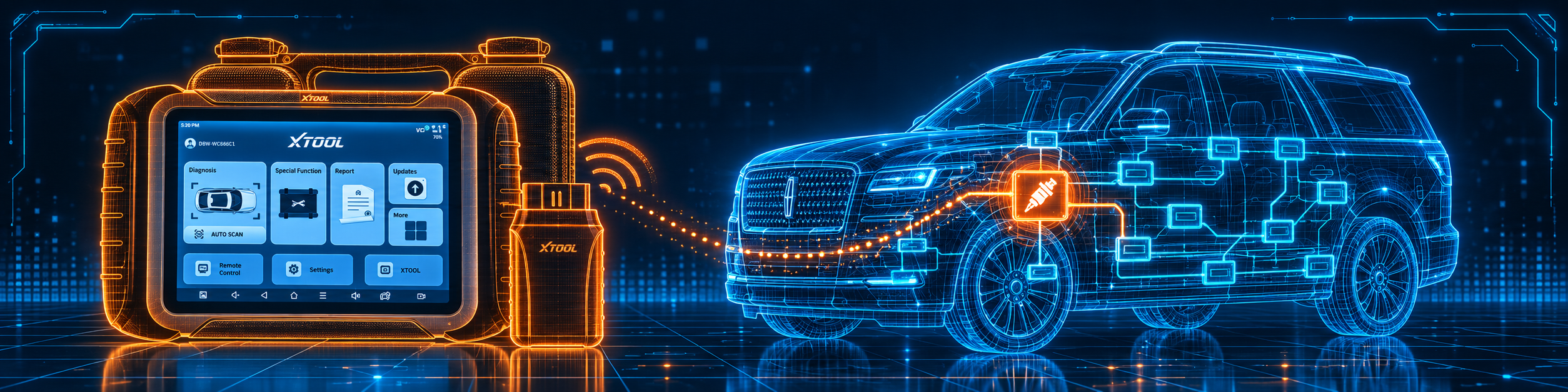
What makes it different from the cheaper tablets in our reviews is the map. After the tool identifies the car, it scans every control module it can find and draws the modules and their connections, with faults colored in. XTOOL says this helps you find the affected system faster, and Amazon says it helps you “narrow down where to start”. The picture below shows the map and a bidirectional test on a Lincoln Navigator.
The Hardware and the Connection
The kit has two parts. The tablet runs the software, and the VCI plugs into the car. Amazon calls the VCI a “built-in Wi-Fi VCI with 2.4GHz & 5GHz dual-frequency, offering up to 64 Mbps within 66 ft”. XTOOL’s Global page says the Wi-Fi connection reaches up to 66 feet and replaces limited Bluetooth. The manual adds a wired option: connect the 16-pin end of the VCI box to the car, then connect a Type-C cable from the box to the tablet. So the D8W works wired or wireless.
XTOOL lists these tablet specs:
- Screen: 8 inch touchscreen, 1024 by 768.
- System: Android 10 on a quad-core 1.5 GHz processor.
- Memory: 64 GB of storage. The XTOOL Tech page says 4 GB RAM, and the XTOOL Global page says 2 GB. Amazon names only 64GB storage.
- Battery: 5000 mAh at 7.2 V on XTOOL’s pages, “5000 mAh 7.3V” on Amazon, charged by Type-C.
- Camera: 8 MP.
- Language: 22 languages, per XTOOL and Amazon.
The picture below shows the wireless connector at work on the same Lincoln Navigator, with the range that XTOOL advertises.

What the D8W Can Do, Job by Job
XTOOL’s manual does something many manuals do not: it gives step lists. We use them below to show what a real job looks like. Your screens may differ, and the manual says the special functions vary by car and model year.
Job 1: Bleeding the brakes on a car with ABS. The manual says to use the ABS bleeding function after replacing a brake distributor pump, after a severe loss of brake fluid, or after changing the brake fluid. The sequence is: read the on-screen precautions, attach a bleeder bottle to the left rear bleeder screw, open it, press OK and pump the brake pedal with steady pushes every 2 seconds. When air bubbles stop, press OK for the next wheel, and repeat for the left front, right front and right rear. Then stop pumping, close the screw and press OK. The manual warns that brake fluid is under pressure and that some cars do not support automatic bleeding.
Job 2: Registering a new battery. The BMS function clears the old low-battery information and matches the new battery. The manual says to turn the ignition on, enter the battery capacity, the battery maker and the 10-digit serial number. Without this step, the manual says, functions such as automatic start-stop or a one-touch power window may stop working.
Job 3: New injectors on a diesel. The injector coding function writes the identification code of the injector into the ECU. You read the stored cylinder values, enter the new 5-digit value for the replaced injector, wait for “Write successfully”, turn the ignition off and on again and check that the new value shows.
Job 4: Steering angle after an alignment. The SAS function stores the straight-ahead position of the wheels, so line up the wheels and the steering wheel first. The manual says to run it after replacing the sensor, steering parts or the steering gearbox, after a four-wheel alignment and after body repair.
Job 5: A DPF warning. The DPF regeneration function walks you through a long list: check the fuel level and the carbon load, choose drive to warm up, follow the screens, start the regeneration, and wait until the screen says the emergency regeneration has completed. The manual says this can take up to 40 minutes, followed by a 2 minute cool-down.
Job 6: A new tire sensor. The manual’s TPMS reset offers four methods: automatic relearn (stand 20 minutes, then drive at 30 to 100 km/h for more than 15 minutes), static relearn with an activation tool in the order left front, right front, right rear, left rear, OBD relearn, and copy ID. The manual says plainly that the scan tool is not a replacement for the TPMS activation tool and offers only reset and relearn. Amazon lists “TPMS Reset” and does not list sensor programming. Plan to buy a separate tool if you program sensors.
Amazon and XTOOL name these other functions:
- All-system diagnosis. Amazon says “OE-Level full-system diagnostics” with read and clear DTCs, ECU info, freeze frame, live data and full OBD2 functions. XTOOL names engine, transmission, ABS, SRS, TPMS, BCM, body and HVAC systems.
- Live data. XTOOL says 8-in-1 live data graphing with playback and CSV export. The manual describes custom PID lists, combined graphs and recording.
- AI help. Amazon says “AI-Assisted Diagnostics helps analyze multiple DTCs and provides diagnostic suggestions”.
- Reports. Both say pre and post scan and a Diagnostic Report V2.0 with a shop logo.
- Services. Amazon names oil reset, throttle body relearn, EPB, ABS, SAS, SRS, gearbox match, BMS reset, injector coding, DPF, crank sensor relearn, TPMS reset, tire size reset, A/F reset, headlight, coolant bleeding, suspension, seat match, ECU configuration, stop/start reset, language change, control unit reset, rain/light sensor, A/C relearn, HV battery, VGT relearn, FRM reset and clutch adaptation. XTOOL’s page names oil reset, EPB, injector coding, DPF, crankshaft relearn, TPMS reset, ABS bleeding, suspension calibration and language change.
- Protocols. Both say CAN FD, DoIP and FCA. XTOOL’s Tech page says DoIP for BMW and Mercedes.
- Updates. Both say three years of free software updates.
What Amazon Says vs. What XTOOL Confirms
We compared the Amazon listing with XTOOL’s Global page, XTOOL’s Tech page and the user manual. They agree on the core. They differ on the coding brands, counts and memory.
| Claim | Amazon listing | XTOOL | Our reading |
|---|---|---|---|
| Name | “XTOOL D8W AI-Assisted Bidirectional Scan Tool with Topology Mapping” | “XTOOL D8W OBD2 Scanner Bidirectional Scan Tool with Topology Mapping” | Same tool |
| Screen | “8” display” | 8 inch, 1024 x 768 | Agree |
| Memory | “64GB storage” | 4+64G (Tech page); 2GB RAM, 64GB (Global page) | XTOOL’s two pages differ |
| Battery | “5000 mAh 7.3V” | “5000mAh x 7.2V” | Agree except the voltage figure |
| Connection | Built-in Wi-Fi VCI, 66 ft | Wi-Fi 66 ft; cable option in the manual | Agree |
| Active tests | “4,000+” | “over 4000” | Agree |
| Service functions | “42+” | “42+” | Agree |
| ECU coding brands | Benz, BMW, Mitsubishi | VW, Audi, Benz, Mitsubishi | The lists differ |
| PMI | Ford, Lincoln, Mazda | Ford, Lincoln, Mazda | Agree |
| DoIP, CAN FD, FCA | All three | All three | Agree |
| Vehicle coverage | “140+ vehicle brands”, “10,000+ models” | “over 150 car brands” | The figures differ |
| Languages | “22+” | “22 languages” | Agree |
| Updates | “3 years” | “3 years”; the manual says installed software stays after the subscription ends | Agree |
| Warranty | Not listed | “2-year warranty” | XTOOL only |
| TPMS | “TPMS Reset” | Reset; the manual says no activation | Reset only |
| ECU coding scope | “advanced ECU Coding” | Brands named | Brand-limited |
The coding point matters. Amazon names coding for Benz, BMW and Mitsubishi, and XTOOL names VW, Audi, Benz and Mitsubishi. Benz and Mitsubishi are on both, and BMW and VW and Audi are on only one list each. Check your brand with the Scanner Finder and XTOOL before you rely on coding. PMI, the module installation feature, is Ford, Lincoln and Mazda on both.
The numbers point matters. Amazon says 140 or more brands and 10,000 or more models. XTOOL says more than 150 brands. These count different things, so we show both.
The memory point matters. XTOOL’s Tech page says 4 GB RAM, the Global page says 2 GB. Amazon gives no RAM figure. We treat RAM as 2 to 4 GB.
The updates point matters. Both sources say three years of free updates. The manual adds that when the subscription expires, the installed software stays but updates stop. It says renewal goes through a dealer or XTOOL support, and no source gives a cost, so we do not give one.
A third source. The US federal standard 49 CFR 571.116 covers motor vehicle brake fluids. It says its purpose is “to reduce failures in the hydraulic braking systems of motor vehicles which may occur because of the manufacture or use of improper or contaminated fluid”, and it requires containers to carry the DOT grade, such as DOT 3, DOT 4, DOT 5 or DOT 5.1. This source is independent of both Amazon and XTOOL. It explains why Job 1 matters: after an ABS bleed, you refill with the grade your car’s cap specifies.
How we handle these differences. The feature table at the bottom of this page, the Scanner Finder and our comparisons follow the Amazon listing, because Amazon is where you buy. We name the points above so you can see where XTOOL says something different. If one of them matters to you, read this section before you decide.
Reading the Codes: Current, History, Pending and Permanent
A scan tool is only as useful as your reading of what it shows. The D8W manual has an appendix that explains the status of each code, and it saves a lot of confusion.
- Current (present) codes are stored in the ECU when the fault is happening, and they turn the warning lamp on the moment they are stored. They can be cleared with the Clear DTC function.
- History (stored) codes are set in conjunction with current codes and are not cleared by the ECU’s own monitor. The manual says they can only be cleared with the tool’s Clear DTC function.
- Pending codes are preliminary. A random fault shows up for a split second during the current drive and sets a pending code. The manual says they are usually not severe, but you should not ignore them, and the tool can clear them.
- Permanent codes cannot be cleared with the tool. The manual says they clear when the ECU’s own monitor completes and passes three consecutive trips.
- Volkswagen group cars show Active or Static, and Passive or Sporadic. Active means the fault is happening at that moment. Passive means it happened in the past and can be cleared with the tool, and you should check whether it returns. The manual says an active fault cannot be cleared directly and the car’s fault must be fixed first.
One more rule from the manual is worth printing and taping to the toolbox. If you clear a code while the fault is still there, the code comes back the next time the ECU runs that test. If the repair is not yours, the manual says not to clear the code, because the stored information can help the next technician.
A Weekend With the D8W: Three Cars, Three Jobs
To show how the tool is used, here is a realistic weekend, built only from functions that Amazon and XTOOL list.
Saturday morning, the minivan. The brake pad light is on after new pads. You connect the VCI, let Auto Scan read the VIN, and open the EPB function. The manual says to release the handbrake, enter maintenance mode, wait for “Successful operation”, and then exit the mode afterwards. Because the brake pads were replaced, the manual says the pad wear sensor line must also be reset, or the car keeps asking for pads. You run Post-scan to confirm no codes remain.
Saturday afternoon, the pickup. The battery is new, and the start-stop system does not work. You open the BMS reset, enter the battery capacity, the maker and the serial number, and confirm. The manual says that without this match, the car may disable auxiliary functions such as automatic start-stop. You scan again to check for battery codes.
Sunday, the crossover with a warning light. You run Auto Scan, and the topology map shows one module in red. You open that system, read the code and its status, check the freeze frame data, which the manual says records the live values at the moment the fault set, and watch the live data while you run an active test. You do not clear the codes until the repair is finished, and then you run Post-scan and keep the report.
None of these jobs needs ECU coding, which is why we say the coding and module installation are for a smaller group of buyers: those who work on Benz, BMW, VW, Audi or Mitsubishi cars for coding, or on Ford, Lincoln or Mazda cars for module installation.
Is the D8W Enough for You?
A short table gives the first answer.
| If your work is | Does the D8W list it? |
|---|---|
| Reading and clearing codes on all systems | Yes |
| Topology map of the modules | Yes |
| Active tests | Yes |
| Oil, EPB, SAS and BMS resets | Yes |
| ABS bleeding, DPF and injector coding | Yes |
| ECU coding on named brands | Yes |
| Module installation on Ford, Lincoln and Mazda | Yes |
| CAN FD, DoIP and FCA access | Yes |
| TPMS sensor programming | Not listed by Amazon or by XTOOL |
| J2534 pass-through | Not listed by Amazon or by XTOOL |
| ADAS calibration | Not listed by Amazon or by XTOOL |
For a garage with several cars or a small shop, the upper rows cover most weeks. The lower rows are work for a different tool.
Will the D8W Work on Your Car?
Amazon says 140 or more brands and 10,000 models across the US, Europe, Asia and Australia. XTOOL says 150 brands from 1996. The manual lists three ways in: Auto Scan reads the VIN, Manual Input takes the 17 characters, and Select Vehicle by Area picks the brand from a region. If the tool does not recognize the car, the manual says to update all software, read the engine ECU information to see whether the VIN can be read, and send the VIN to XTOOL. Use the Scanner Finder to check your year, make and model. Our DoIP explainer and CAN FD explainer say what the newer protocols are.
Setting Up the D8W the First Time
This follows the manual. The first hour decides whether the tool feels easy.
- Charge the tablet with the Type-C cable. The D8W also charges quickly, per Amazon.
- Connect the VCI. Plug the 16-pin end into the car’s OBD2 port. For the wired option, add the Type-C cable from the VCI box to the tablet. The manual lists a vehicle voltage range of 9 to 36 V DC.
- Activate and update. Open the update screen and install all the software packages it finds. The manual says to download them again if XTOOL support changes the language.
- Set your shop information. The report header uses the workshop details you enter in the system setup.
- Identify the car with Auto Scan, then choose the system to test.
- Run Pre-scan, do the repair, run Post-scan. The two reports are your before and after record.
- Print the report through a third-party printer app. The manual says the tool has no printer driver, so install an app on the tablet, add the printer, and print the PDF from the Report screen.
- Ask for remote help if you get stuck. The Remote button starts a TeamViewer session that lets XTOOL support control the tablet, once you allow it.
Common Mistakes and Three Simple Plans
1. Expecting TPMS sensor programming. The manual says the tool does not activate or program sensors.
2. Assuming your brand is on the coding list. Amazon and XTOOL do not name the same brands.
3. Clearing codes before a shop visit. The manual says the stored information helps the next technician.
4. Switching the tool off during a function. The manual says not to cut power or unplug during a test.
Plan A: Brake fluid change on a car with ABS
- Identify the car and open the ABS bleeding function.
- Follow the wheel order on screen, with a helper pumping the pedal.
- Refill with the DOT grade on your car’s reservoir cap.
Plan B: Replacing the battery on a start-stop car
- Fit a battery of the same type and capacity.
- Run the BMS reset and enter the capacity, maker and serial number.
- Scan again to confirm there are no battery codes.
Plan C: A shop check on an unfamiliar car
- Run Auto Scan and read the topology map.
- Open the system with the fault and read live data.
- Run an active test, fix the cause, and save the Post-scan report for the customer.
How the D8W Compares With Other Tablets in Our Reviews
| XTOOL D8W | Autel MK900-BT | Foxwell NT809BT | |
|---|---|---|---|
| Connection | Wi-Fi VCI, wired option | V150, Bluetooth | Bluetooth connector |
| DoIP and CAN FD | Yes | Yes, per our MK900-BT review | Yes, per our NT809BT review |
| ECU coding | Named brands | Not listed in our MK900-BT review | Not listed in our NT809BT review |
| Module installation | Ford, Lincoln, Mazda | Not listed in our MK900-BT review | Not listed in our NT809BT review |
| Updates | Three free years | One free year, per our review | Three free years, per our review |
Our Autel MK900-BT review covers a Bluetooth tablet with a longer service list and no coding. Our Foxwell NT809BT review covers a tablet with active tests and resets and no coding. For coding with named brands on a tablet, see our Autel MP808S review.
The D8W is the coding tablet of this group. It adds the map, the Wi-Fi range and the module installation.
Who This Scanner Actually Fits
The D8W fits a busy home garage or a small shop that wants a map of the car, a long reset list, named-brand coding and a wireless connector. It is more tool than you need for one car and one code a year. It is a weaker fit for someone who needs TPMS sensor programming, J2534 pass-through or ADAS calibration.
Important Limitations of the XTOOL D8W
- Coding is brand-limited. The two sources name different lists.
- PMI is for Ford, Lincoln and Mazda only.
- TPMS is reset and relearn only.
- The memory figure differs between XTOOL’s pages.
- Updates stop after three years. The installed software stays.
- Functions depend on the car. The manual says the special functions vary by model and year.
Who Should Choose It, and What to Consider Instead
Choose the D8W if you want the module map, a long reset list, named-brand coding and a wireless connector in one tablet.
Consider the Autel MK900-BT instead if you want a longer service list and no coding. Consider the Foxwell NT809BT instead if you want active tests and resets with three free years. Consider the XTOOL IP819 instead if you want a smaller XTOOL tool and can do without the map.
| Specification | Details |
|---|---|
| Screen | 8 inch, 1024 by 768 |
| System | Android 10, quad-core 1.5 GHz |
| Memory and storage | 2 to 4 GB RAM, 64 GB |
| Battery | 5000 mAh |
| Connection | Wi-Fi VCI, up to 66 feet; wired Type-C option |
| Active tests | 4000 or more |
| Service functions | 42 or more |
| ECU coding | Named brands; lists differ |
| Module installation | Ford, Lincoln, Mazda |
| CAN FD, DoIP, FCA | Yes |
| Updates | Three free years |
| Warranty | Two years, per XTOOL |
| Pros | Cons |
|---|---|
| Topology map of all modules | Coding brand lists differ |
| 4000 or more active tests | TPMS is reset and relearn only |
| Wi-Fi range of 66 feet, wired option | RAM figure differs between pages |
| Three free update years | Updates stop after the third year |
The picture below shows the scan tool on the Lincoln Navigator, where TPMS stays at reset level.

Methodology: How SCG Evaluates OBD2 Scanners.
Our Verdict on the XTOOL D8W
The D8W is a tablet for people who want to see the whole car at once, and then reset and code what they find. Amazon and XTOOL agree on the core and differ on coding brands, counts and memory. If your brands are on the coding list and TPMS sensor work is not your daily job, it fits well.
Frequently Asked Questions
Does the D8W support bidirectional control?
Yes. Amazon and XTOOL both say 4,000 or more active tests.
Does it support ECU coding?
Yes, for named brands. Amazon names Benz, BMW and Mitsubishi, and XTOOL names VW, Audi, Benz and Mitsubishi.
What is PMI?
Programmable module installation. It transfers a module’s data into a new module on Ford, Lincoln and Mazda, per Amazon and XTOOL.
Does it support DoIP and CAN FD?
Yes. Both sources list both, and XTOOL’s Tech page names BMW and Mercedes for DoIP.
Is it wireless?
Yes. It has a Wi-Fi VCI with a range of 66 feet, and the manual describes a wired option.
Can it program TPMS sensors?
No. It resets and relearns. The manual says it is not a replacement for a TPMS activation tool.
How long are updates free?
Three years, per both sources. After that, installed software stays and updates stop.
Can I print the report?
Yes, through a third-party printer app on the tablet, as the manual describes.
Does it show freeze frame data?
Yes. The manual says the freeze frame records the live values at the moment a fault code was set, for the vehicles that support it.
What happens if I clear a code before the repair?
The code returns the next time the ECU runs the test, per the manual.
Can XTOOL help me remotely?
Yes. The Remote button starts a TeamViewer session, and you decide whether to allow control.
Is it compatible with my specific vehicle?
Use the Scanner Finder to check your year, make and model.
Trusted Sources
- XTOOL D8W official product page: features, specifications, update and warranty
- XTOOL D8W technical page: hardware, languages, DoIP
- XTOOL D8W user manual: connection, special functions, update, remote help
- Verified Amazon listing: current title and listing text
- 49 CFR 571.116, Motor vehicle brake fluids: what brake fluid standards cover