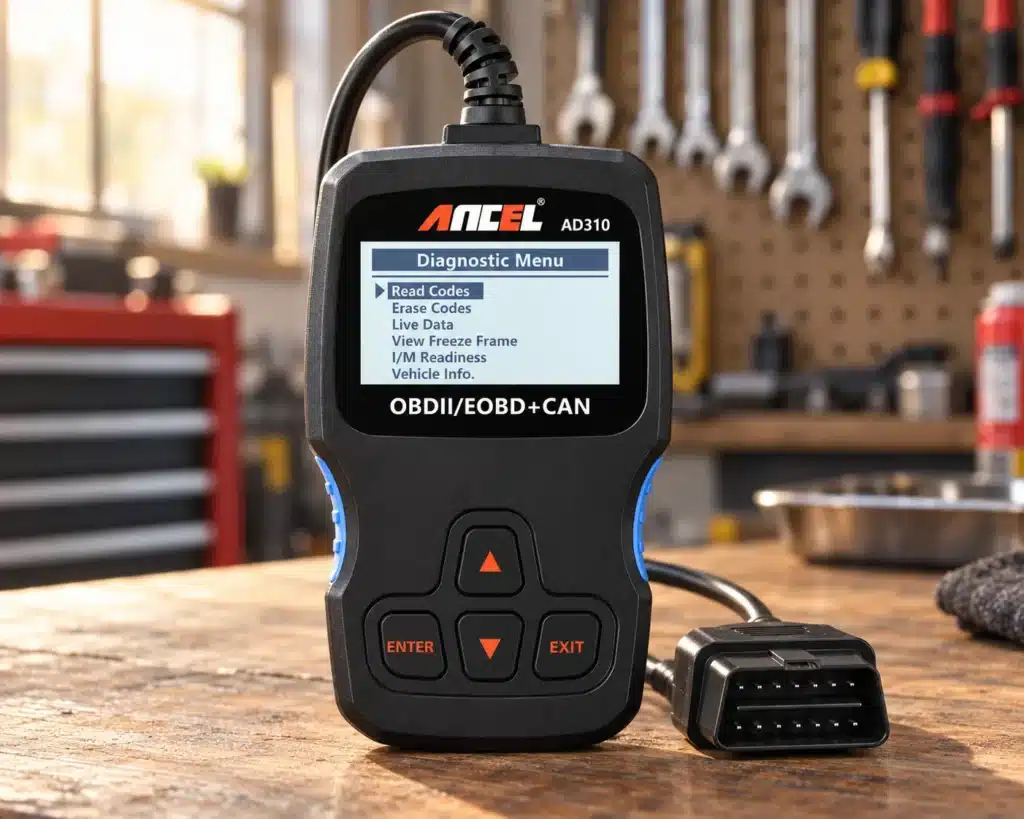
The ANCEL AD310 is a basic OBD2 code reader for the Check Engine light. You plug it in, it reads the trouble codes your car saved, and it clears them after the fix. It uses a 2.5 foot cable, takes power from the car, and needs no batteries or app. A four-button menu in eight languages makes it easy for a first-time owner.
The short version: the AD310 is the simplest way to learn why the Check Engine light is on. ANCEL’s official website lists stored and pending codes, freeze frame, live data, I/M readiness, an EVAP test and vehicle information. It focuses on emission-related engine problems, so for ABS, airbag, transmission or service resets, a bigger tool such as the Innova CarScan Advisor 5210 or the Foxwell NT604 Elite will serve you better.
Affiliate Disclosure: As an Amazon Associate I earn from qualifying purchases. Scan Choice Guide is a participant in the Amazon Services LLC Associates Program, an affiliate advertising program designed to provide a means for sites to earn advertising fees by advertising and linking to Amazon.com.
What the AD310 Actually Does
The ANCEL AD310 is a basic OBD2 code reader. You plug it in, it reads the trouble codes your car saved, and it can clear them. That is its whole job, and it does it simply.
Many Check Engine lights come from small problems, like a loose gas cap or a tired oxygen sensor. A code reader tells you where to look, so you stop guessing.
This review is written for someone who has never held a scan tool. It shows each menu step by step, and it tells you plainly what you get.
ANCEL’s official website lists these functions for the AD310:
- Trouble codes: it reads and erases emission-related trouble codes, generic and manufacturer-specific.
- Stored, pending and past codes. Pending codes are early warnings the car has seen, but not often enough to turn the light on.
- Freeze frame data. A snapshot of what the car was doing when the code was saved.
- Live data. Engine readings in real time.
- I/M readiness. Shows whether the car’s emission self-checks have finished.
- EVAP test. A check of the fuel vapor system.
- Vehicle information. Details such as the VIN.
The live data list on ANCEL’s website includes fuel system status, coolant temperature, vehicle speed, throttle position, engine load, spark advance, oxygen sensors, fuel trims, manifold pressure and intake air temperature.
ANCEL names these OBD2 protocols: KWP2000, J1850 VPW, ISO9141, J1850 PWM and CAN. A protocol is the language the car and the tool use to talk. The tool picks the right one for you.
Not sure what a code means? Our guide to OBD2 codes explains the letters and numbers. The live data guide explains what each reading shows.

What Amazon Says vs. What ANCEL Confirms
We compared the Amazon listing with ANCEL’s official website and ANCEL’s user manual. Most points agree. Several do not.
| Claim | Amazon listing | ANCEL | Our reading |
|---|---|---|---|
| Works on 1996 and newer OBD2 cars | Yes | Yes | Agree |
| Reads and clears emission-related codes | Yes, stated at the end of the listing | Yes, per the user manual | Agree |
| Cable length about 2.5 feet | Yes | Yes | Agree |
| Powered by the car, no batteries | Yes | Yes | Agree |
| ABS, airbag, transmission | No, points to a bigger ANCEL model | Not listed on ANCEL’s product page | Not supported |
| Light trucks and SUVs | Yes | One ANCEL page says yes, another lists trucks, pickups and vans as not supported | ANCEL pages disagree |
| Asian cars | “2000 EU-based and Asian cars” | One ANCEL page says 2005 and newer | The year differs |
| Protocols | “all OBDII protocols”, lists five | Lists five, another page says up to seven | Same five names, wording differs |
| Size and weight | 12 oz, 8.9 x 6.9 x 1.4 in | Tool: 125 x 70 x 22 mm, 0.23 kg (0.32 kg with packaging), per the user manual | Amazon’s numbers match the package |
| OBD I cars | No, even with an adapter | OBD II only | Agree |
The trucks and vans point matters. One ANCEL product page lists trucks, pickups and vans as not supported. Another ANCEL page and the Amazon listing say the AD310 works with light trucks and SUVs. If you drive a pickup or a van, our Scanner Finder shows whether it fits.
Only emission-related problems. The Amazon listing says the AD310 cannot read engine faults that are not tied to the emission system. This is more narrow than “reads engine codes”, which is how many reviews describe it.
ANCEL also says hybrids and electric cars are not supported, and that some Japanese and Korean brands can have problems.
Is the AD310 Enough for You?
Start with what you want to do. The table shows when this reader is enough and when it is not.
| If you want to… | Is the AD310 enough? |
|---|---|
| Learn why the Check Engine light came on | Yes |
| Clear the light after a repair | Yes |
| Check if the car is ready for an emissions test | Yes |
| Watch engine data while the car runs | Yes |
| Read ABS or airbag warnings | No |
| Read transmission codes | No |
| Reset the oil service light | Not listed on ANCEL’s product page |
| Test parts, like a fan or a pump | No |
| Use your phone as the screen | No |
If your answer is “no” to something you need, look at the best OBD2 scanners for beginners or the best scanners under $100.
A simple rule helps. If the light on your dashboard is the engine symbol, a code reader like this is the right size of tool. If the light is for ABS or an airbag, you need a scanner that reads those systems, and the AD310 does not.
Will the AD310 Work on Your Car?
Short answer: if you drive a gasoline or 12 volt diesel car from 1996 or newer, yes. Our Scanner Finder gives you a recommendation for your exact year, make and model.
| Vehicle | Works? |
|---|---|
| US cars, 1996 and newer | Yes |
| European cars, 2000 and newer | Yes |
| Asian cars, 2005 and newer | Yes |
| Light trucks and SUVs | Yes, per the Amazon listing and one ANCEL page |
| Pickups and vans | Listed as not supported on one ANCEL page |
| Hybrids and electric cars | No |
| Cars with an older OBD I port | No |
Two details help you read this table. The Amazon listing says 2000 and newer for European and Asian cars, while one ANCEL page says 2005 and newer for Asian cars. And ANCEL says some Japanese and Korean brands can have problems.
If your car is a pickup or a van, the sources point in different directions, so the Finder is the best next step.
If you need ABS, airbag or transmission codes, or a service reset, read the section on limitations below. Our guide Will Any OBD2 Scanner Work With My Car? explains how compatibility works.
How to Set Up and Use the AD310
What is in the box
ANCEL’s website lists the AD310 scanner, a user guide and a USB cable. The cable that connects to the car is attached to the scanner and is about 2.5 feet long. The USB cable is in the box. The pages we read do not say what it is for.
Set it up before the first use
Do this with the scanner plugged into the car and the engine off.
- Plug the AD310 into the OBD2 port (steps below).
- Turn the ignition to “on”. Do not start the engine.
- When the main menu appears, choose Language and pick yours. The AD310 supports English, French, German, Spanish, Dutch, Finnish, Portuguese and Russian.
- Choose Contrast and adjust it until the text is easy to read.
- Choose Unit of Measure and pick metric or US units.
ANCEL’s user manual lists four items in the main menu: Diagnostics, Language, Contrast and Unit of Measure. The screen is small, 128 by 64 pixels, so a good contrast setting matters.
Connect the AD310
The AD310 has four buttons: UP, DOWN, ENTER and EXIT. ENTER confirms. EXIT goes back one step. UP and DOWN move through the lists.
ANCEL’s manual has a safety rule worth repeating. Do not operate or watch the tool while you drive. Do your checks with the car parked.
- Turn the car off.
- Find the OBD2 port. It is a 16-pin trapezoid socket, usually under the dashboard on the driver’s side. Our flagship guide shows where the port is and how scanners get power.
- Plug the AD310 in. Push the connector straight in until it sits firmly. A loose connector causes most “no connection” messages.
- Turn the ignition on. Do not start the engine.
- Wait. The AD310 reads the car’s details, such as the VIN, then shows the main menu.
Read the trouble codes
- From the main menu choose Diagnostics.
- Choose Read Codes.
- Choose Stored or Pending.
- Use UP and DOWN to move through the list.
Stored codes are problems the car has saved. These turn on the Check Engine light. Pending codes are earlier warnings.
Write the codes down. A phone photo of the screen is enough.
View freeze frame data
Choose View Freeze Frame in the Diagnostics menu. The snapshot can show whether the problem happened when the engine was cold or hot, or at what speed. Take a photo of it before you clear anything. Once you clear the codes, the snapshot is gone.
Check I/M readiness
I/M stands for inspection and maintenance. Many states test whether the car’s emission self-checks have finished. The AD310 shows this under I/M Readiness. Use it before an emissions test. If some checks show as not ready, drive normally for a few days and check again. This often happens right after you clear codes or disconnect the battery.
Watch live data
Choose Live Data. ANCEL’s manual mentions values such as voltage, RPM and temperature. Live data on a small screen is best for simple checks. Is the engine temperature climbing? Does the speed reading match the dashboard? The AD310 is not a graphing tool.
See vehicle information
Choose Vehicle Info. The manual says the AD310 shows the VIN, the Calibration ID and the Calibration Verify Number. The VIN is the car’s identity number. The other two identify the software your car’s engine computer uses for emissions. You do not need them for daily use.
Clear the codes
- Choose Erase Codes from the Diagnostics menu.
- Confirm with YES.
- For this step the key must be on and the engine off.
If clearing does not work, you will see Erase Failure.
Clear only after the repair. If the cause is still there, the light comes back. Clearing also wipes the freeze frame snapshot and resets the emission checks to “not ready”. Our article What to Do After an OBD2 Trouble Code gives the full order of steps.
Messages you may see
ANCEL’s manual lists two messages.
“LINKING ERROR”. The AD310 cannot talk to the car. Check in order: is the ignition on, is the connector pushed in all the way, and is the car OBD2 compliant? If it still fails, try the same tool on another car. Our guide Why Won’t My OBD2 Scanner Connect? has the long version.
“Erase Failure”. The codes were not cleared. Check that the key is on and the engine is off, then try again.
If the screen stays dark, the tool is not getting power. It needs 8 to 18 volts from the car, so a weak battery or a bad port connection is the first place to look.
Heat, cold and power
ANCEL’s manual gives these limits:
| Item | Limit |
|---|---|
| Working temperature | 0 to 50 °C (32 to 122 °F) |
| Storage temperature | minus 20 to 70 °C (minus 4 to 158 °F) |
| Power | 8 to 18 volts from the car |
In winter, a tool left in a freezing garage may be colder than 32 °F, so warm it up inside before you use it. In summer, a closed car can get very hot, so do not leave the AD310 in the glove box on a hot day. A dead or weak battery can drop the voltage below 8 volts, and then the tool may not turn on.
The manual gives the tool as 125 by 70 by 22 millimeters and about 0.23 kilograms. The Amazon listing shows 12 ounces and 8.9 by 6.9 by 1.4 inches, which match the box more than the tool.
Common Mistakes and Three Simple Plans
Seven mistakes with a basic reader
1. Clearing the code right away. It only hides the problem for a while, and it wipes the freeze frame snapshot.
2. Treating one code as a part number. A code points to a system, not to a part. Look first, buy later.
3. Starting the engine while the tool is plugged in. ANCEL’s own guide warns that some scanners can be damaged this way.
4. Using the tool while driving. ANCEL’s manual says not to.
5. Expecting ABS or airbag codes. The AD310 is built for emission-related engine problems.
6. Ignoring pending codes. A pending code is an early warning. Note it, and check it again after a few drives.
7. Clearing codes right before an emissions test. This resets the emission self-checks to “not ready”, and the car can be turned away.
Plan 1: The Check Engine light just came on
- Look at the light. A steady light means the car needs service, not an emergency stop. A blinking light is more serious and should be checked quickly.
- Park safely and turn the engine off.
- Plug in the AD310 and turn the ignition on, engine off.
- Open Read Codes and check Stored first, then Pending.
- Photograph the screen, then open View Freeze Frame and photograph that too.
- Do not clear anything yet.
- Look the code up, then check the simple things first.
- After the repair, clear the codes with Erase Codes and drive normally. If the light returns, the repair is not finished.
Plan 2: You have an emissions test coming
- Plug in the AD310 and turn the ignition on, engine off.
- Open I/M Readiness.
- If everything is ready, you are good to go.
- If some checks are not ready, do not clear anything. Drive normally for several days, including some highway driving, and check again.
- If the Check Engine light is on, fix the cause first. A test usually fails with the light on.
Rules differ by state, so check your state’s test rules. We explain what the tests look at in What Is OBD2 and How Does an OBD2 Scanner Work?.
Plan 3: The AD310 will not connect
- Make sure the ignition is on.
- Push the connector in firmly.
- Check that the car is a 1996 or newer OBD2 car.
- Look for a “LINKING ERROR” message.
- Try the tool on another car if you can.
- If the screen stays dark, check the car battery. The tool needs 8 to 18 volts.
- If it is a pickup or a van, use our Scanner Finder to check your exact vehicle.
A simple record sheet
Keep a note for every scan. A phone note is enough.
| Date | Mileage | Code | Stored or pending | Freeze frame notes | What I did |
|---|---|---|---|---|---|
| (fill in) | (fill in) | (fill in) | (fill in) | (fill in) | (fill in) |
If the problem comes back, this record saves time. A mechanic can see what the car reported before.
Handheld or phone adapter?
The AD310 is a handheld tool with its own screen. A handheld works without a phone, a signal or an app. A small adapter that shows data on a phone is smaller and can show more on a big screen. Our article Bluetooth vs. Standalone OBD2 Scanners compares the two ways of working.
Cost of owning it
We do not list a price, because prices change. A few things are worth knowing. ANCEL gives a one-year warranty on one of its pages. The AD310 needs no batteries. The ANCEL pages we read do not mention a subscription or an app fee. No information about updates is published on Amazon or by the manufacturer, so pay close attention to this detail if updates matter to you.
Where the AD310 Sits Against the Alternatives
Cells are Yes, No or “Not listed”, each with the source named.
| Feature | ANCEL AD310 | Innova CarScan Advisor 5210 | Foxwell NT604 Elite |
|---|---|---|---|
| Emission-related engine codes | Yes | Yes | Yes |
| Live data | Yes | Yes | Yes |
| ABS codes | No | Yes | Yes |
| Airbag (SRS) codes | No | No | Yes |
| Transmission codes | No | Not listed on Innova’s product page | Yes |
| Oil reset | Not listed on ANCEL’s product page | Yes | No |
| Bidirectional control | No | No | No |
| Wireless | No | Yes | Not listed on Foxwell’s product page |
Read it this way: the AD310 is the simplest tool. The Innova adds ABS and an oil reset. The Foxwell adds ABS, airbags and transmission, but no service resets. For what each term means, see what full-system diagnostics means.

Who This Scanner Actually Fits
The AD310 fits a driver who wants one answer: why is the Check Engine light on? It suits a first-time driver who is nervous about tools, a person who wants a spare reader in the glove box, and someone checking a used car before buying. It is made for a regular gasoline or diesel car, and you can use it after five minutes.
Important Limitations of the ANCEL AD310
ANCEL’s own product text says the AD310 supports emission-related problems. It does not list ABS, airbag (SRS) or transmission support. The Amazon listing says the same, and points shoppers who need those systems to a bigger ANCEL model.
In plain words:
- No ABS or airbag codes. If the ABS or airbag light is on, this reader will not read it.
- Not every engine code. The Amazon listing says an engine fault that is not tied to the emission system cannot be read.
- No transmission codes.
- No oil reset or other service resets. They are not listed on ANCEL’s product page.
- No bidirectional control. It cannot send commands to parts.
- No Bluetooth or Wi-Fi. It works only with its cable.
- No hybrids or electric cars.
- No OBD I cars.
A code reader shows where to look. It does not tell you which part to replace. Read Can an OBD2 Scanner Tell You Exactly What’s Wrong? before you buy a part based on one code.
Who Should Choose It, and What to Consider Instead
Choose the ANCEL AD310 if you want a simple code reader for the Check Engine light.
Consider the Innova CarScan Advisor 5210 instead if you also want ABS codes and an oil reset. Consider the Foxwell NT604 Elite instead if you want ABS, airbags and transmission in one handheld tool. If you want to see data on your phone, a small adapter is a better fit than any handheld.
| Specification | Details |
|---|---|
| Type | Handheld OBD2 code reader |
| Screen | LCD, 128 x 64 pixels, white backlight, contrast adjustment |
| Buttons | Four: Up, Down, Enter, Exit |
| Cable | About 2.5 feet |
| Power | From the car’s OBD2 port, 8 to 18 volts, no batteries |
| Size and weight | 125 x 70 x 22 mm, about 0.23 kg, per ANCEL’s user manual |
| Working temperature | 0 to 50 °C (32 to 122 °F) |
| Phone connection | No |
| Languages | English, French, German, Spanish, Dutch, Finnish, Portuguese, Russian |
| Vehicles | Most 1996 and newer US cars, 2000 and newer EU cars, 2005 and newer Asian cars, per ANCEL’s website |
| Engines | Gasoline and 12V diesel cars |
| Warranty | One year, per ANCEL’s website |
| Updates | Not listed on ANCEL’s product page |
| Pros | Cons |
|---|---|
| Simple four-button menu that a first-time user can follow | Focused on emission-related engine problems |
| Reads, shows and clears codes, with freeze frame and I/M readiness | The screen is small, 128 x 64 pixels |
| No batteries, powered by the car | |
| Eight menu languages | |
| Compact handheld with a 2.5 foot cable |

Methodology: How SCG Evaluates OBD2 Scanners.
Our Verdict on the ANCEL AD310
The ANCEL AD310 does one job and does it simply: it shows why the Check Engine light came on and clears it after the fix. We recommend it to first-time owners and to anyone who wants a simple code reader. If you also need ABS, airbags or service resets, choose a bigger tool.
Frequently Asked Questions
Does the ANCEL AD310 need batteries?
No. It takes power from the car’s OBD2 port. It needs 8 to 18 volts.
Can the AD310 read ABS or airbag codes?
No. ANCEL lists it for emission-related codes only.
Does the AD310 work on trucks?
It is not clear. The Amazon listing and one ANCEL page say light trucks and SUVs work. Another ANCEL page lists trucks, pickups and vans as not supported. Our Scanner Finder checks your exact vehicle.
Should I clear the code right away?
No. Write down the codes and take a photo of the freeze frame first. Clearing wipes that snapshot.
Does it connect to a phone?
No. It has its own screen and a cable. It has no Bluetooth or Wi-Fi.
Does the AD310 reset the oil light?
It is not listed on ANCEL’s product page. The Innova CarScan Advisor 5210 lists an oil reset.
What does “LINKING ERROR” mean?
The tool cannot talk to the car. Check the ignition, the connector and whether the car is OBD2 compliant.
Does the AD310 get updates?
No information about updates is published on Amazon or by the manufacturer, so pay close attention to this detail.
Trusted Sources
- ANCEL AD310 product page
- ANCEL AD310 page on anceltech.com
- ANCEL guide: How to use the ANCEL AD310
- ANCEL AD310 user manual (ManualsLib)
- Amazon listing for the ANCEL AD310 (exact ASIN B01G5EA74I), “About this item” text checked 2026-10-07