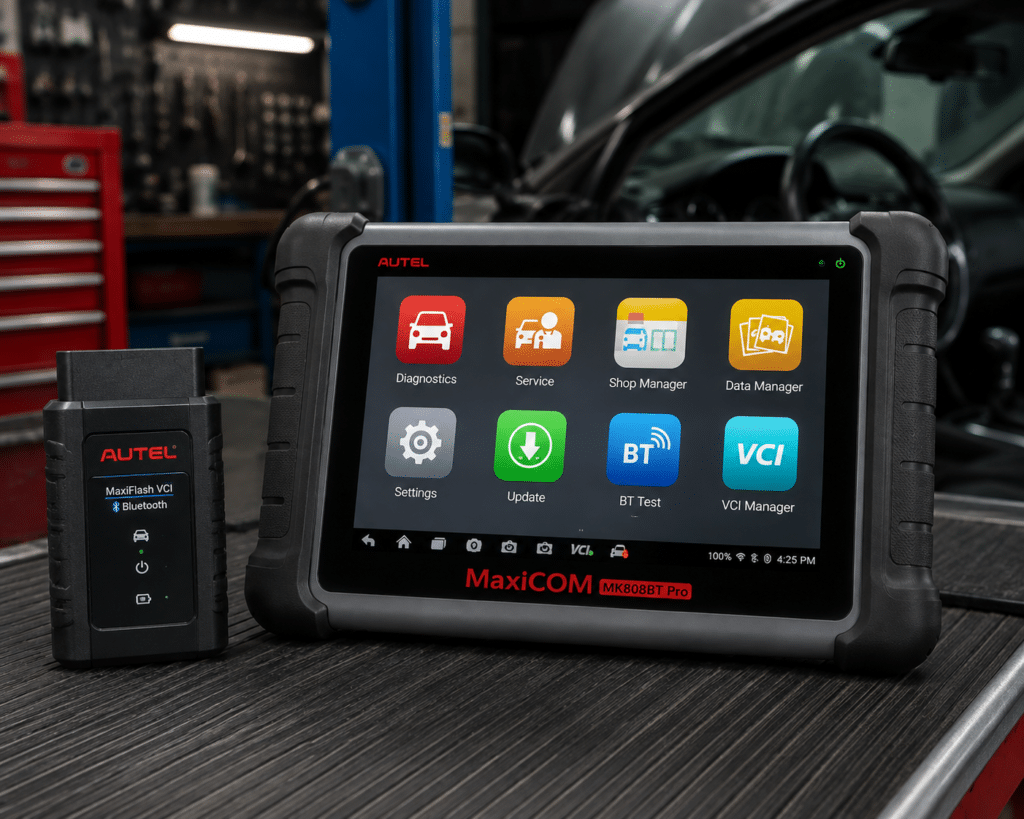
The Autel MaxiCOM MK808BT Pro is a 7 inch Android tablet that talks to the car through a small wireless interface called the MaxiVCI Mini. It reads and clears codes on the systems it can reach, shows live data as text and graphs, displays freeze frame data and runs active tests that command parts such as relays, solenoids and windows. Autel’s manual describes a short list of service functions in detail: oil reset, electric parking brake, tire pressure monitor sensor service, battery management, steering angle sensor and diesel particulate filter regeneration. The Bluetooth link has a working range of about 33 feet, which is the main thing that separates it from the Wi-Fi only MK808Z in the same family.
The short version: the MK808BT Pro is a sensible mid-range tablet for a home mechanic or a small shop that wants active tests and a long list of resets without a cable running from the dashboard to the tablet. Amazon, Autel’s product page, Autel’s store and Autel’s user manual agree on the screen, the Android 11 platform, the 64 GB of storage, the 5000 mAh battery, the Bluetooth range and the first free year of updates. They disagree on how many makes and services the tool covers, on whether it can unlock a Chrysler gateway on 2017 or 2018 cars, and on how much the tablet weighs. Amazon sellers also describe it as “the same as the MK900BT”, a claim that Autel’s own pages do not make. The details are below, in plain terms.
Affiliate Disclosure: As an Amazon Associate I earn from qualifying purchases. Scan Choice Guide is a participant in the Amazon Services LLC Associates Program, an affiliate advertising program designed to provide a means for sites to earn advertising fees by advertising and linking to Amazon.com.
What Is in the Box and What the Hardware Is
Autel’s store page lists the contents: the MaxiCOM tablet, the MaxiVCI Mini, a USB power adapter, two USB cables (one for connecting the tablet to the interface and one for charging), a carrying strap, a packing list, a quick reference guide and a carrying case. The Amazon listing we checked describes the same kit as a tablet with a wireless interface and lists the extra hardware that is sold separately: the MaxiBAS BT506 battery tester and the MV108S videoscope camera. Autel’s manual confirms both are optional add-ons that must be purchased on their own.
The hardware numbers are consistent across sources. The screen is a 7 inch capacitive touchscreen at 1024 by 600. The processor is a quad-core Cortex-A55 at 1.8 GHz, which Amazon names by its chip family (Rockchip RK3566) while Autel names it by its core type. Memory is 4 GB of RAM and 64 GB of storage, with a memory card slot that takes up to 64 GB. Wi-Fi covers the 2.4 and 5 GHz bands. The battery is 3.7 V and 5000 mAh, and Autel’s store page says it gives around seven hours of continuous use. Autel’s product page lists a charging input of 5 V at 1.5 A, while the V1.5 user manual lists 5 V at 3 A, so charge it with the adapter from the box.
The weight is the one hardware number that does not match. Autel’s product page gives 885 grams and the store page gives 788 grams. We cannot say which is right for your unit, and the difference is not large enough to change a buying decision, but it is a reminder that listing pages are not always edited together.
The wireless interface is small. Autel’s manual lists the MaxiVCI Mini at 47 by 23 by 51 millimeters and 33 grams. It accepts 12 to 24 volts, draws 150 milliamps at 12 volts, uses Bluetooth 2.1 with Enhanced Data Rate and also works over a Mini USB cable. It powers on whenever it is plugged into the car’s data link connector. The picture below shows the tablet and the MaxiVCI Mini controlling the power windows and door locks of a Ford F-150 over Bluetooth.

What Amazon Says vs. What Autel Confirms
We compared the Amazon listing with Autel’s product page, Autel’s store listing and the V1.5 user manual. The table shows the points where the sources agree and where they do not.
| Claim | Amazon listing | Autel | Our reading |
|---|---|---|---|
| Platform | Android 11, 4-core RK3566, 4 GB RAM and 64 GB | Android 11, Cortex-A55 quad-core 1.8 GHz, 4 GB and 64 GB | Agree |
| Screen | Not given in the bullets we read | 7 inch, 1024 by 600 | Autel only |
| Bluetooth range | About 33 feet (10 m) | About 33 feet (10 m), manual and store page | Agree |
| Active tests | “3000+ active tests for 99% of components” | Active tests exist and “vary by vehicle”; no total is given | The tests are real; the number is the seller’s |
| Service functions | “28+”, and in another paragraph “37+” | “28+” on the store page; manual describes six service types in detail | Use 28+ as the maker’s figure; check your car |
| Vehicle coverage | “150+ brands” | “over 80” on the store page; 1996 and newer | Autel’s figure is more conservative |
| Chrysler gateway | “2018+ FCA SGW” and “2015+ Renault SGW” | “Certified by FCA”, 2017 and newer | Different start years; check your car |
| CAN FD and DoIP | Listing compares it to the MK900BT | Not mentioned on the MK808BT Pro pages | Not confirmed for this tablet |
| ECU coding | “Injector Coding” in the service list | “Injector Coding” in the store list; no general coding described | Treat coding as limited |
| TPMS | Not named in the bullets we read | Basic only on the product page; manual describes a sensor ID and reset service | See the section below |
| Battery tester | “Battery Test with BT506” | BT506 is a separate accessory | Agree; not in the box |
| Videoscope | Works with MV108S | Manual lists MV105S, MV108S, MV105, MV108 as separate accessories | Agree; not in the box |
| Updates | One free year; most cars still work afterward, online features do not | “One year of free updates”; manual says the first year is free | Agree; what comes after is not stated by Autel |
| Warranty | One year | One year limited warranty; 30-day return on the store page | Agree |
| Languages | 21 or more; a serial number must be sent to the seller to unlock another language | Not stated on the pages we read | Seller only |
The sales numbers in the listing deserve a closer look because they are the ones a buyer remembers. The “3000+” active tests figure appears again and again on Amazon listings for Autel tablets. Autel’s manual describes active tests as “vehicle-specific subsystem and component tests” and says the available tests vary by vehicle. That is a real feature, and the manual shows how it works: the tablet sends commands to the ECU to activate the actuators, and you follow on-screen instructions to switch a solenoid, relay or switch between two states. No page from Autel that we read gives a total test count, so the number is best read as a seller’s estimate.
The same caution applies to “150+ brands”. Autel’s store page says over 80, and the product page says US, Asian and European vehicles from 1996 and newer. Both can be true if one counts makes and the other counts brands, models or sub-brands, but a buyer should rely on the lower figure and check the car.
The Chrysler gateway line shows the same pattern. Amazon says 2018 and newer. Autel’s store page says the tablet is certified by FCA and can reach the gateway module on 2017 and newer Fiat, Chrysler, Jeep and Dodge vehicles. The difference is small, but it is a good example of why we say “check your car” so often. The gateway is a security module that sits between the data link connector and the rest of the car’s networks, and a tool that is not approved sees only a few modules behind it.
A third source. The Bluetooth Special Interest Group, which sets the Bluetooth standard, describes the Classic radio used by devices of this generation as a low power radio that streams data over 79 channels in the 2.4 GHz band. It limits maximum transmit power to 100 milliwatts and says devices must not exceed the levels set by regulators where they are sold. That is why a quoted range such as 33 feet is a typical figure and not a guarantee: walls, metal bodies, other 2.4 GHz devices and a busy shop all change the real distance. Autel’s own manual agrees. It says that if the link is unstable, you should stand closer to the interface.
How we handle these differences. The bottom table of this page, the Scanner Finder and our comparisons follow the Amazon listing, because Amazon is where you buy. In the text we name every point where Autel says something different or adds detail, so that you can decide for yourself.
Where This Review Corrects Our Earlier Version
An earlier version of this review said that no TPMS functions are documented for this tablet. Autel’s V1.5 manual, which we read in full for this update, includes a section titled Tire Pressure Monitoring System Service. It says the function lets you look up tire sensor IDs from the vehicle’s ECU and perform TPMS replacement and reset procedures after sensors are replaced. Autel’s product page, on the other hand, lists only basic TPMS and reserves the advanced features (sensor activation, programming and health check) for a different model with a TPMS tool. Both statements are consistent if you read them together: the MK808BT Pro can read the sensor IDs the car already stores and walk you through a relearn, but it does not activate or program sensors itself. If you change tires often, a dedicated TPMS tool is still the more convenient choice.
The earlier version also said the tablet has no ECU coding. That remains true in the sense that matters: neither the product page nor the manual describes general module coding. The manual does describe a Special Function menu, which it defines as functions that perform “various component adaptations, including the recalibration or configuration of certain components after repairs or replacements”. That covers calibrations and relearns, not the kind of coding that changes how a module is configured on a new car. The store page lists “Injector Coding”, which belongs to the same family of vehicle-specific adaptations.
What the Tablet Does During a Scan
Autel’s manual describes the diagnostic menu in a clear order. After the tablet identifies the car, which it can do by AutoVIN, it offers a function menu. The options vary slightly by vehicle, and the manual lists them:
- ECU Information shows the details the module reports about itself.
- Trouble Codes contains Read Codes and Erase Codes.
- Live Data displays parameters from the ECU, which can be shown as text, graphs or meters.
- Active Test opens vehicle-specific tests of subsystems and components.
- Special Function performs component adaptations such as recalibration after a repair.
The manual adds that the toolbar lets you save and print results at any point in the test, that data logging and help are available, and that reports can be saved in the cloud and shared. These are the tools a home mechanic will use every week. Reading and clearing codes, watching live data while the engine runs and running an active test before replacing a part are the core of what a bidirectional tablet is for.
Bidirectional control is the feature people buy a tablet like this for, so it is worth being clear about its limits. Autel’s pages describe it as sending commands to the ECU to activate actuators such as ABS components, windows and solenoids. The Amazon listing gives examples: turning on the radiator fan, modulating the throttle, windows, mirrors, injector buzz test, interior and exterior lights, wipers, horn, doors and headlamps. Which of these your car accepts depends on the car. A 2012 pickup and a 2024 crossover will show very different menus on the same tablet.
The Service Functions: What the Manual Describes
Autel advertises “28+” services. Amazon says “28+” in one place and “37+” in another. The manual describes six service types in its own chapter and says “the most commonly used services are described in this chapter”, which means other services exist inside the vehicle menus. Here are the six, in the manual’s order.
| Service | What the manual says it does |
|---|---|
| Oil reset | Resets the engine oil life system after an oil change so the car can calculate the next interval |
| Electric parking brake | Retracts and resets the brake for pad replacement, with warnings to work on level ground and reactivate the system afterward |
| TPMS | Looks up tire sensor IDs from the ECU and runs replacement and reset procedures after sensors are changed |
| Battery management | Evaluates charge state, monitors current, registers a replacement battery, activates the rest state and can charge through the diagnostic socket; not supported by all vehicles |
| Steering angle sensor | Stores the straight-ahead position after steering or alignment work and clears the sensor’s fault memory |
| Diesel particulate filter | Manages forced regeneration, filter replacement teach-in and teach-in after replacing the engine control unit |
The manual is careful with the battery service in a way that is useful for a buyer. It warns that if a battery is replaced with a different type, for example lead acid to AGM, or with a different capacity, the car may require reprogramming of the new battery type in addition to the reset. Always match the battery to the original specification and read the vehicle manual.
The diesel particulate filter service comes with its own conditions. Before a forced regeneration the manual asks you to check that the fuel light is not on, that no filter related faults are stored, that the car has the specified engine oil and that the oil is not contaminated. A forced regeneration raises exhaust temperature for a prolonged time, so it needs a clear area and time. The picture below shows the tablet running a regeneration service on a Ford F-150 pickup.

Is the MK808BT Pro Enough for You?
| If your work is | Does the MK808BT Pro list it? |
|---|---|
| Reading and clearing codes on the modules the tool can reach | Yes |
| Live data as text, graph and meter | Yes |
| Active tests (relays, solenoids, windows, lights) | Yes; the list varies by vehicle |
| Oil reset, parking brake, steering angle, battery registration, DPF regeneration | Yes; vehicle specific |
| TPMS sensor ID lookup and reset | Yes; sensor activation and programming are not listed |
| Chrysler gateway on 2017 or 2018 and newer cars | Yes, per Autel and Amazon; start year differs |
| Battery test | With the BT506, sold separately |
| Videoscope | With a MaxiVideo camera, sold separately |
| CAN FD or DoIP on the newest cars | Not listed by Autel for this tablet |
| ECU coding and module programming | Not listed by Autel |
| Free updates after the first year | No; the first year is free |
For most owners of cars built between the late 1990s and the middle of the last decade, the top of this table covers the daily work. The bottom of the table is where a more expensive tablet earns its price.
Will It Work on Your Car?
Autel’s pages say it covers US, Asian and European vehicles from 1996 and newer. Amazon extends the range to 2026 model years and says the global update of March 2024 supports models up to 2024 for several European makes. The practical meaning is that an older car is almost certainly covered for codes and live data, and a recent car needs its own check. The Amazon seller also offers to check compatibility if you send the VIN, make, model and year before you order, and says that all service and special functions are vehicle specific. Our Scanner Finder gives a recommendation for your exact year, make and model without sending anything to anyone.
Your First Hour With the MK808BT Pro
This section follows Autel’s manual.
- Charge the tablet with the supplied adapter and cable before the first start.
- Switch it on and register it. Registration happens in the Autel User Center application or on Autel’s website. You need the serial number and password shown under Settings, About. The manual says updates are free for the first year from the date of purchase.
- Update the software over Wi-Fi from the Update application. Tap Update All or pick items one at a time. The tablet must be registered first.
- Plug the MaxiVCI Mini into the car’s data link connector. It powers on by itself. The Power LED turns solid green when it is connected properly.
- Pair the tablet with the interface. Open the VCI Manager and choose Bluetooth. The manual recommends Bluetooth as the first choice because it avoids repeated plugging and unplugging, and offers the Mini USB cable as a fallback.
- Identify the car. AutoVIN reads the identification number, and you can enter it by hand if it fails.
- Run an all-systems scan, save the report, then choose Active Test or Special Function for the job in front of you.
The manual repeats a safety point that deserves attention: only perform service work such as parking brake maintenance when the vehicle is stationary and on level ground, and reactivate the system afterward.
Care, Storage and Everyday Habits
Autel’s manual has a short maintenance chapter, and following it keeps a tablet like this working for years. Clean the touch screen with a soft cloth and alcohol or a mild window cleaner, and avoid abrasive cleaners, detergents and automotive chemicals. Dry your hands before using it, because the screen may not respond to wet fingers. Keep the devices dry, away from dust and inside the normal operating temperature range of 0 to 50 degrees Celsius for the MaxiVCI Mini and the tablet. Check the housing, wiring and connectors for dirt and damage before and after each use, and use only authorized chargers and accessories, because the warranty does not cover damage caused by unapproved ones.
The warranty is a limited one year warranty for the original retail purchaser, covering defects in material or workmanship with proof of purchase. It does not cover abnormal use, accidents, unauthorized changes, altered serial numbers, extreme temperatures, cosmetic damage or external causes such as fire, dirt and battery leakage. The manual also reminds you that contents may be deleted during a repair, so back up your saved reports first. Keep the receipt with the serial number.
Common Mistakes and Three Simple Plans
- Buying on the strength of a test count. The number on the listing is not the number of tests your car will offer.
- Assuming it equals a pricier model. The listing compares it to the MK900BT, and Autel’s pages for the MK808BT Pro do not claim CAN FD, DoIP or coding.
- Forgetting the accessories. The battery tester and the videoscope are separate purchases.
- Working at the edge of the Bluetooth range. Stay close for services that should not be interrupted.
- Letting the update year pass. The tool keeps working, but new coverage and online features stop.
Plan A: A weekend oil and brake job
- Connect the interface and scan all systems.
- Run the oil reset or parking brake service from the Service menu.
- Clear codes and scan again.
Plan B: A new battery
- Match the type and capacity to the original.
- Run the battery registration service.
- Confirm there are no leftover codes.
Plan C: An unknown fault
- Read codes and freeze frame data.
- Watch live data on a graph while the problem happens.
- Run an active test on the suspect part before replacing it.
How the MK808BT Pro Compares With Other Autel Tablets
| MK808BT Pro | MK808Z | MK900-BT | |
|---|---|---|---|
| Vehicle link | Wireless MaxiVCI Mini, about 33 feet | Wi-Fi only tablet | Wireless, larger tablet |
| Screen | 7 inch | 7 inch | 8 inch |
| Active tests | Yes | Yes | Yes |
| CAN FD and DoIP | Not listed | Not listed | Listed by Autel |
| Service functions | 28+ per Autel | See our MK808Z review | 40+ per Autel |
Our Autel MaxiCOM MK808Z review covers the tablet that is the closest sibling. Our Autel MaxiCOM MK900-BT review covers the larger tablet with newer protocol support.
Who This Scanner Actually Fits
The MK808BT Pro fits a home mechanic who works on several cars, a small shop that wants to move around the bay, and a mobile technician who wants one bag. It also fits a buyer who likes the Autel software layout, the cloud reports and the option to add a battery tester later. It does not fit someone who services the newest cars that depend on CAN FD or DoIP, someone who needs coding or programming, or someone who expects free updates for life.
Important Limitations of the Autel MaxiCOM MK808BT Pro
- CAN FD and DoIP are not listed on the pages for this tablet.
- General ECU coding and programming are not described. The Special Function menu covers calibrations and relearns.
- TPMS is basic. It reads sensor IDs and guides a relearn; it does not activate or program sensors.
- Updates are free for the first year only. The tool keeps working afterward, but online features stop, per Amazon.
- The active test list depends on the car, and the “3000+” figure is a seller number.
- Chrysler gateway access has two start years in the sources, 2017 and 2018.
- The battery tester and the videoscope are sold separately.
Who Should Choose It, and What to Consider Instead
Choose the MK808BT Pro if you want a 7 inch tablet with a wireless interface, active tests and a good set of resets, and your cars do not depend on the newest protocols.
Consider the Autel MaxiCOM MK808Z instead if you are happy with a Wi-Fi only tablet and want to keep the cost down.
Consider the Autel MaxiCOM MK900-BT instead if you need CAN FD and DoIP support for newer cars or a larger screen.
| Specification | Details |
|---|---|
| Display | 7 inch capacitive touchscreen, 1024 by 600 |
| Platform | Android 11, quad-core Cortex-A55 at 1.8 GHz, 4 GB RAM, 64 GB storage |
| Vehicle interface | MaxiVCI Mini, Bluetooth about 33 feet, Mini USB fallback |
| Battery | 3.7 V, 5000 mAh, around 7 hours of continuous use |
| Bidirectional control | Yes, active tests that vary by vehicle |
| Service functions | 28+ per Autel; oil, EPB, TPMS, BMS, SAS and DPF described in the manual |
| Coverage | US, Asian and European vehicles, 1996 and newer |
| Chrysler gateway | Certified per Autel, 2017 and newer |
| CAN FD and DoIP | Not listed |
| ECU coding | Not described; injector coding only as a service |
| Updates and warranty | First year free; one year limited warranty |
| Pros | Cons |
|---|---|
| Wireless interface with about 33 feet of range | CAN FD and DoIP are not listed for this tablet |
| Active tests, live data graphs and freeze frame data | Updates are free for the first year only |
| Oil, parking brake, TPMS, battery, steering angle and DPF services in the manual | Coding and programming are not described |
| Works with a battery tester and a videoscope sold separately | Seller numbers (tests, brands) are higher than Autel’s |
The picture below shows the tablet connected to a Ford F-150 with ECU coding marked as unavailable, a reminder of the main limit of this model.

Methodology: How SCG Evaluates OBD2 Scanners.
Our Verdict on the Autel MaxiCOM MK808BT Pro
The MK808BT Pro does what Autel’s own pages and manual say: active tests, live data, a good list of services and a wireless link that works at room size distances. It does not do what some Amazon titles imply, which is to match the MK900BT on protocols and coding. If your cars are not the very newest and you want freedom from a cable, it is a sound choice. If they are, spend the extra for a model that lists the newer protocols.
Frequently Asked Questions
Does the MK808BT Pro really work “as” the MK900BT?
Not fully. The pages for the MK808BT Pro do not list CAN FD or DoIP, and Autel’s separate MK900-BT page does. The two share active tests and a similar service base.
Does the MK808BT Pro support ECU coding?
Not general coding. The store page lists injector coding as a service, and the manual describes a Special Function menu for component adaptations. Neither describes module coding or programming.
Does it do TPMS?
It does the basics. The manual describes looking up tire sensor IDs and running replacement and reset procedures. Sensor activation and programming are not listed.
How long does the Bluetooth range last in a real shop?
Autel quotes about 33 feet. Walls, metal and other wireless devices reduce it, and the manual advises standing closer if the signal is unstable.
Do I have to pay for updates?
The first year is free. After that the tool keeps working, but Amazon says features that need online servers are unavailable, and Autel does not state the terms of a renewal on the pages we read.
Does it unlock the Chrysler gateway?
Autel says it is certified by FCA for 2017 and newer vehicles. Amazon says 2018 and newer. Check your car.
Is the battery tester included?
No. The MaxiBAS BT506 is a separate accessory, as is the MV108S videoscope camera.
Is the MK808BT Pro compatible with my vehicle?
Autel lists coverage across US, Asian and European vehicles from 1996 and newer, but system and service coverage varies. Run your year, make and model through the Finder before buying.
What is the difference between the MK808BT Pro and the MK808Z?
Both run active tests on a 7 inch tablet. The MK808BT Pro adds the wireless MaxiVCI Mini with about 33 feet of range; the MK808Z is Wi-Fi only.
Trusted Sources
- Autel MaxiCOM MK808BT PRO / MK808Z-BT / MK808K-BT product page: specifications, features, protocol list
- Autel store listing for the MK808BT Pro: box contents, Bluetooth range, FCA certification, updates, warranty and returns
- MaxiCOM MK808BT Pro User Manual V1.5: menus, active tests, service chapter, MaxiVCI Mini, registration, warranty
- Bluetooth Special Interest Group technology overview: Classic radio, 2.4 GHz band, maximum transmit power
- Amazon listing for the Autel MaxiCOM MK808BT Pro (ASIN B07KXDKWRS): title, bullets, description checked 2026-10-14