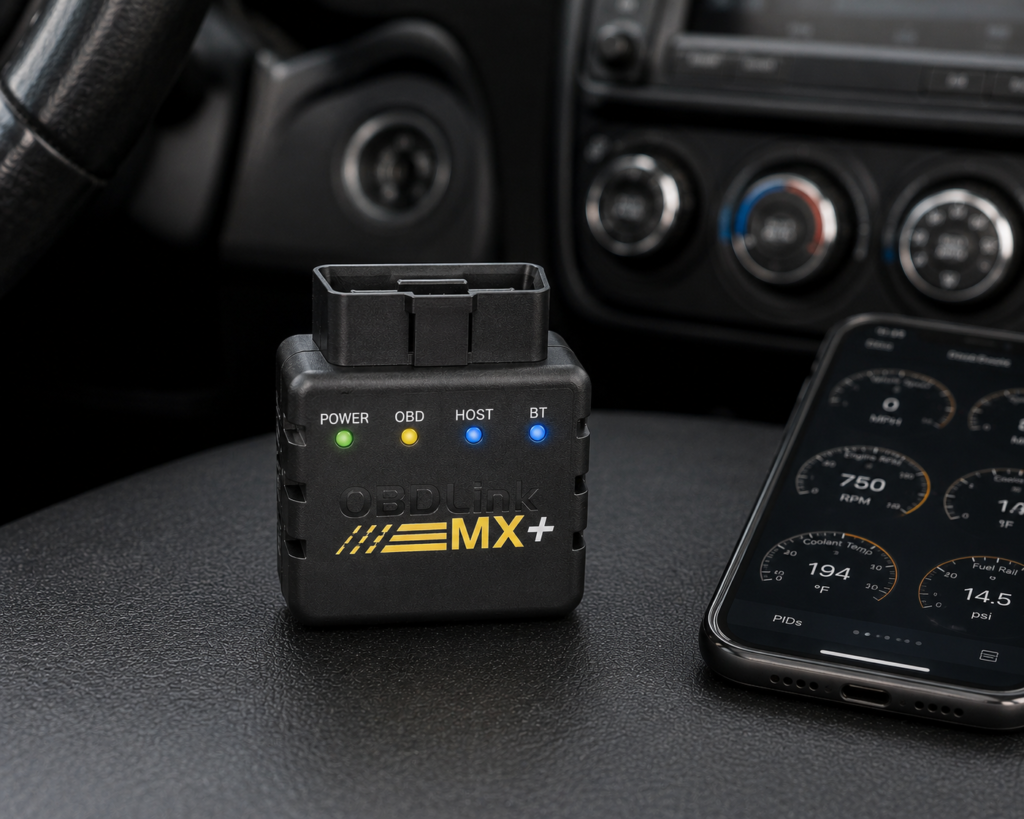
Buy the OBDLink MX+ if you already know which third-party diagnostic app you want to run, FORScan, BimmerCode, Torque, Carista, or one of dozens of others, and you want a fast, reliable Bluetooth adapter to power it. Skip it if you want ABS, SRS, or TPMS module-specific diagnostics out of the box, OBDLink’s own technical page doesn’t back up that claim the way Amazon’s listing implies, more on that below.
The short version: the MX+ is a Bluetooth OBD2 adapter, not a standalone scanner with its own screen or app-independent diagnostic logic. What it actually does, read and clear generic codes, stream live data fast, and hand that connection off to whichever app you choose, is confirmed directly by OBDLink’s own documentation and by SCG’s Master Data capability record. What it doesn’t do is bidirectional control or ECU coding, and Amazon’s own bullet points oversell the breadth of module coverage beyond what OBDLink’s core spec page actually states.
What the OBDLink MX+ Actually Does
OBDLink’s own product page confirms the MX+ is a Class 2 Bluetooth v3.0 adapter with 128-bit data encryption, an operating voltage range of 8-18V, overvoltage protection up to 100V, and a low-power BatterySaver mode that drops current draw to 2 mA when the vehicle is off, so it won’t drain a battery left plugged in overnight. It measures 1.97 x 1.77 x 0.91 inches and weighs about 3 ounces. OBDLink backs the MX+ with an unconditional 180-day money-back guarantee and a 3-year warranty, both stated directly on the manufacturer’s own page.
On protocol support, OBDLink’s page confirms coverage of all legislated OBD2 protocols plus “advanced Ford & GM vehicle networks (MS-CAN and SW-CAN),” compatible with 1996-and-newer cars and light trucks sold in the U.S., plus EOBD, JOBD, and other international OBD2 variants. The adapter ships with free OBDLink apps for iOS, Android, and Windows, plus OBDWiz software, but its real function is as a bridge: OBDLink’s own compatible-apps page and independent app documentation confirm it as a recommended adapter for FORScan, Torque, BimmerCode, DashCommand, AlfaOBD, and Carista, among others. Data throughput is fast for the category, OBDLink states support for up to 100 data samples per second, a meaningful advantage if you’re graphing live sensor data in real time rather than glancing at a single value.
Master Data confirms exactly three capabilities for this device: Read DTC, Clear DTC, and Live Data. Bidirectional control and ECU coding are not linked to this entity anywhere in SCG’s capability records, and neither OBDLink’s own product page nor its technical documentation claims either function for the MX+.
What Amazon Says vs. What OBDLink Confirms
Amazon’s listing for the MX+ advertises “Advanced Diagnostics: Clear check Engine Light and get more live parameters (ABS, SRS, TPMS, etc) than other scanners.” [Amazon] OBDLink’s own product page makes no mention of ABS, SRS, or TPMS anywhere in its capability description, the manufacturer’s stated coverage is generic OBD2 protocols plus Ford and GM advanced networks, not module-specific ABS, SRS, or TPMS diagnostics. [OBDLink] Master Data’s capability links for this entity confirm only Read DTC, Clear DTC, and Live Data, none of which are module-specific to ABS, SRS, or TPMS systems. Treat Amazon’s “ABS, SRS, TPMS” phrasing as unconfirmed by the manufacturer’s own core spec page.
Amazon’s listing separately claims “Enhanced OEM Support for Ford, GM, Mazda, Nissan/Infiniti, Toyota/Lexus/Scion, Honda, Hyundai, Kia.” [Amazon] OBDLink’s own technical page names only “advanced Ford & GM vehicle networks (MS-CAN and SW-CAN)” as the specific enhanced coverage, it does not name Mazda, Nissan, Toyota, Honda, Hyundai, or Kia anywhere on that page. [OBDLink] The wider brand list may be accurate, OBDLink’s separate compatible-apps documentation does reference broader third-party app support across more makes, but it is not something the manufacturer’s own core technical page independently confirms in the same breath as the enhanced-network claim.
Where Amazon and OBDLink do agree without qualification: this is a fast, reliable Bluetooth adapter, not a device with bidirectional control or ECU coding. Neither page claims either function, and Master Data doesn’t link either capability to this entity. [Amazon] [OBDLink]
What this means for you: the core function, fast Bluetooth OBD2 connectivity for third-party apps, is solid and independently confirmed. The “ABS, SRS, TPMS” live-parameter claim and the seven-brand enhanced support list are Amazon-only phrasing that OBDLink’s own spec page doesn’t back up point for point, if module-specific ABS/SRS/TPMS access matters to your job, confirm it through the specific app you plan to pair with the adapter, not through the adapter’s own marketing.
An Adapter Is Only as Capable as the App You Pair With It
The single most important thing to understand about the MX+ before buying it is that it has no diagnostic logic of its own beyond reading and clearing generic codes and streaming live data. Everything else, ABS bleeding procedures, BMW coding, Ford-specific module access, depends entirely on which third-party app you install and pair it with. OBDLink’s own documentation is built around this model: the adapter is the hardware bridge, and FORScan, BimmerCode, Carista, and similar apps supply the vehicle-specific logic and command sets.
This cuts both ways. It’s the MX+’s biggest strength for someone who already knows they want FORScan for a Ford or BimmerCode for a BMW, since OBDLink is widely recommended as the reference-grade adapter for both. It’s also the biggest reason to skip it if you want a single package that works out of the box without picking, configuring, and in some cases paying for a separate app. BlueDriver and the Thinkcar THINKDIAG products bundle their own proprietary app and diagnostic logic directly with the hardware, so there’s no assembly required. The MX+ asks you to do that assembly yourself, in exchange for more flexibility once you have.
Where the MX+ Sits Among Bluetooth Adapters
At $139.95, the MX+ is the most expensive of the pure Bluetooth code-reader adapters in SCG’s launch pool, ahead of BlueDriver at $94.95, the Veepeak OBDCheck BLE+ Plus at $41.98, and the Veepeak OBDCheck VP11 at $14.99. That price gap buys faster data sampling (up to 100 samples/second per OBDLink’s own documentation, well above what basic ELM327-class adapters typically offer) and broader third-party app compatibility, including apps like FORScan and BimmerCode that some cheaper adapters either don’t support or support with caveats.
Against the BlueDriver, the tradeoff is app flexibility versus app simplicity. BlueDriver bundles its own proprietary app with “Confirmed Fix” repair context and enhanced ABS/SRS/TPMS code reading built in, no app-shopping required, at a lower price. The MX+ costs more and requires you to pick your own app, but that app can be swapped for whatever the job calls for, FORScan for Ford-specific work, BimmerCode for BMW coding tasks, Carista for other platforms, rather than being locked into one vendor’s diagnostic logic.
Against the Veepeak OBDCheck BLE+ Plus, the MX+ costs roughly 3.3x more for materially faster data sampling and (per OBDLink’s reputation among FORScan and BimmerCode users specifically) more consistent connection stability with those specific apps. Neither adapter offers bidirectional control or ECU coding; if that’s the requirement, neither one is the right category of tool. For that, SCG’s data points toward the Thinkcar THINKDIAG, which starts at $109.99, cheaper than the MX+, and includes confirmed bidirectional control and ECU coding in its own bundled app.
Who This Scanner Actually Fits
The MX+ fits a DIYer or enthusiast who already has a specific third-party app in mind, someone doing Ford-platform work with FORScan, BMW coding with BimmerCode, or multi-brand work with Carista or OBD Fusion, and wants the fastest, most compatible adapter available for that app rather than a bundled all-in-one package. It’s a poor fit for someone who wants to plug in a device and start diagnosing immediately without picking and setting up separate software, and it’s the wrong category entirely for anyone who needs bidirectional control, ECU coding, or built-in service reset functions.
Important Limitations
No bidirectional control or ECU coding is confirmed anywhere in Master Data or on OBDLink’s own pages for this device. It has no standalone app of real diagnostic depth, the bundled OBDLink app is a basic reader, getting real value out of the MX+ means installing and configuring a separate third-party app, some of which (like FORScan or Carista’s premium tier) may carry their own costs or licensing separate from the adapter itself. The manufacturer’s core technical page does not confirm the ABS/SRS/TPMS live-parameter claim Amazon’s listing makes, so don’t buy this specifically expecting module-specific diagnostics without verifying that claim through your chosen app first.
Choose It, Skip It, or Consider Something Else
Choose the OBDLink MX+ if you already know which third-party app you want, FORScan, BimmerCode, Carista, or another supported app, and you want the fastest, most broadly compatible Bluetooth adapter to run it on.
Skip it if you want a single bundled app with repair guidance built in and nothing else to configure, or if you need bidirectional control or ECU coding, Master Data doesn’t confirm either for this device.
Consider the BlueDriver instead if you’d rather have one proprietary app with “Confirmed Fix” repair context built in, at a lower price, without picking a third-party app yourself.
Consider the Veepeak OBDCheck BLE+ Plus instead if you want the same third-party-app-dependent model at a substantially lower price and don’t need the MX+’s faster sampling rate.
Consider the Thinkcar THINKDIAG instead if you need bidirectional control and ECU coding, functions Master Data confirms for the THINKDIAG and does not confirm for the MX+, at a lower price than the MX+.
| Specification | Details |
|---|---|
| Price | $139.95 (Amazon, ASIN B07JFRFJG6) |
| Connectivity | Class 2 Bluetooth v3.0, 128-bit encryption |
| Protocols | All legislated OBD2 protocols; advanced Ford & GM networks (MS-CAN, SW-CAN); EOBD, JOBD, international variants |
| Vehicle compatibility | 1996 and newer cars/light trucks sold in the U.S. (confirm your exact vehicle via the SCG Finder) |
| Data sampling | Up to 100 samples/second per OBDLink’s documentation |
| App model | Bundled basic OBDLink app; designed to pair with third-party apps (FORScan, BimmerCode, Torque, Carista, and others) |
| Bidirectional control | Not confirmed (Master Data, OBDLink’s own pages) |
| ECU coding | Not confirmed (Master Data, OBDLink’s own pages) |
| Update/subscription policy | Free firmware/software updates, no subscription, per OBDLink’s official page |
| Warranty | 180-day money-back guarantee; 3-year warranty (OBDLink’s own page) |
| Pros | Cons |
|---|---|
| Fast, well-documented sampling rate for live data (up to 100/sec) | No bidirectional control or ECU coding confirmed |
| Broad, reference-grade third-party app compatibility (FORScan, BimmerCode, Carista, more) | No real diagnostic logic of its own; requires a separate app for anything beyond basic reading |
| 3-year warranty and 180-day money-back guarantee, stated directly by OBDLink | Amazon’s ABS/SRS/TPMS live-parameter claim isn’t backed by OBDLink’s own core spec page |
| No subscription required for the adapter itself | Most expensive pure Bluetooth adapter in SCG’s launch pool |
How we evaluated it: SCG evaluates scanner specifications, diagnostic capabilities, vehicle compatibility, update policy, and the exact Amazon listing against manufacturer documentation and the SCG Master Data system. SCG has not physically tested this scanner unless explicitly stated otherwise.
Data last verified: 2026-08-28.
Methodology: How SCG Evaluates OBD2 Scanners.
Our Verdict
The OBDLink MX+ is a well-documented, reference-grade Bluetooth adapter for anyone already committed to a specific third-party diagnostic app. Its core claims, fast sampling, broad app compatibility, no subscription, hold up against OBDLink’s own documentation. What doesn’t hold up quite as cleanly is Amazon’s marketing language around ABS/SRS/TPMS live parameters and a seven-brand enhanced support list, neither of which OBDLink’s own technical page independently confirms in the same terms. If you need a plug-and-play package instead of an app-picking exercise, BlueDriver is the simpler buy at a lower price. If you need bidirectional control or ECU coding, this isn’t the right category of device at any price, look at the THINKDIAG instead.
Frequently Asked Questions
Does the OBDLink MX+ support bidirectional control?
No. Master Data does not link bidirectional control to this entity, and OBDLink’s own product page makes no claim of it. If you need that function, the Thinkcar THINKDIAG confirms it at a lower price.
Does the OBDLink MX+ actually read ABS, SRS, and TPMS codes, like Amazon’s listing says?
Not confirmed by OBDLink’s own core technical page, which describes generic OBD2 protocol coverage plus advanced Ford and GM network access, not ABS/SRS/TPMS module diagnostics. Master Data confirms only Read DTC, Clear DTC, and Live Data for this device. Any module-specific access would come from the third-party app you pair with it, not the adapter’s own baseline capability, verify with your specific app before relying on it.
Do I need a specific app to use the OBDLink MX+?
It ships with a free basic OBDLink app, but its real value comes from pairing it with a third-party app suited to your vehicle or task, FORScan for Ford platforms, BimmerCode for BMW coding, Carista or OBD Fusion for broader multi-brand work, among others OBDLink documents as compatible.
Is the OBDLink MX+ compatible with my vehicle?
OBDLink confirms support for 1996-and-newer cars and light trucks sold in the U.S. across all legislated OBD2 protocols. Use the SCG Finder to confirm your exact year, make, and model before buying.
Is the OBDLink MX+ worth the price difference over the Veepeak BLE+ Plus?
It depends on your app. If you’re running FORScan or BimmerCode, the MX+’s faster sampling and reference-grade compatibility with those specific apps are a documented advantage. If you just need basic code reading and live data at the lowest possible cost, the cheaper Veepeak adapters cover the same baseline capabilities.
Trusted Sources
- OBDLink MX+ official product page — specifications, protocol support, warranty terms
- OBDLink compatible apps page — third-party app compatibility list
- Verified Amazon listing (ASIN B07JFRFJG6) — current listing, marketed claims