Buy the BlueDriver if you want a phone-based scan tool that reads generic and enhanced manufacturer codes, including ABS, SRS, and TPMS, with real repair context and no subscription fee. Skip it if you need the scanner itself to send a command back to a module, BlueDriver’s own documentation is explicit that this is a reading and diagnosing tool, not a bidirectional-control device, more on what that actually rules out below.
The short version: BlueDriver’s core pitch, enhanced code reading across a documented list of systems and brands, “Confirmed Fix” repair reports, and no subscription, holds up cleanly against the manufacturer’s own pages. Amazon’s listing and BlueDriver’s own site agree on almost everything that matters. The one thing worth flagging isn’t a conflict so much as a completeness gap: BlueDriver’s main product page emphasizes ABS, Airbag, and Climate Control in its headline capability list, while TPMS, which Amazon puts front and center in the product title, only shows up explicitly once you check BlueDriver’s separate vehicle compatibility page.
What the BlueDriver Actually Does
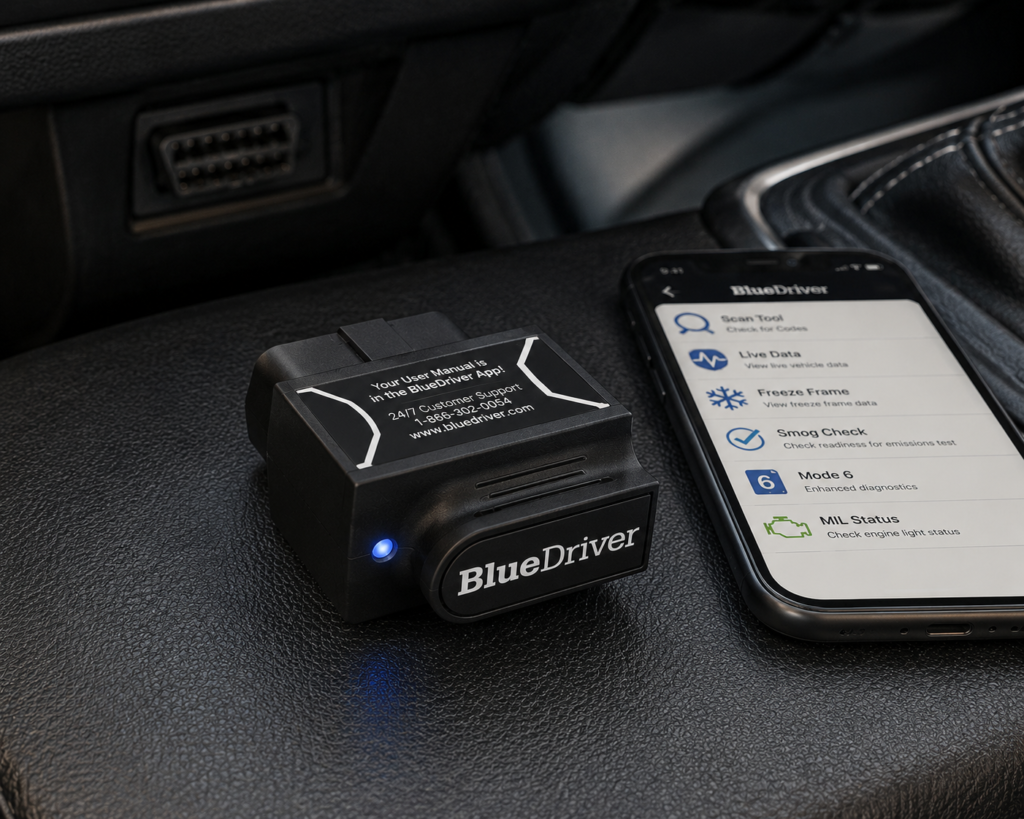
BlueDriver’s own product page confirms it as a Bluetooth dongle that plugs into the OBD2 port and pairs with the free BlueDriver app on iOS or Android, there’s no screen on the unit itself. It covers 1996-and-newer gas, diesel, and hybrid vehicles sold in North America. Core functions confirmed directly by the manufacturer include reading and clearing standard OBD2 codes, enhanced manufacturer-specific codes across a documented list of brands, live data streaming, freeze frame snapshots, Mode 6 advanced test results (like misfire counts), and I/M readiness checks for smog and emissions testing.
Enhanced diagnostics extend to ABS, airbag/SRS, transmission, and TPMS codes on GM, Ford, Chrysler, Toyota, Nissan, Honda, BMW/Mini, Volkswagen/Audi, Mercedes/Smart, Mazda, Subaru, Mitsubishi, and Hyundai/Kia, per BlueDriver’s own compatibility documentation, though the company is upfront that coverage varies by specific model and year and recommends checking its compatibility tool before buying for a specific vehicle. Master Data confirms Read DTC, Clear DTC, and Live Data for this entity, plus two additional linked capability codes consistent with its enhanced-diagnostic feature set.
BlueDriver’s standout feature beyond code reading is its “Confirmed Fix” reports, real repairs other mechanics recorded for the same code on the same vehicle, generated for each DTC alongside possible causes. That’s a meaningfully different value proposition than a bare code lookup: instead of guessing what a P0301 means for your specific car, you get what technicians actually did to resolve that exact code on that exact model.
What Amazon Says vs. What BlueDriver Confirms
Amazon’s listing title for this exact product reads “BlueDriver OBD2 Scanner Bluetooth, No Subscription, ABS SRS TPMS | OBDII Diagnostic Scan Tool, Car Scanner & Code Reader, iPhone & Android, Check Engine, Repair Reports, Vehicles 1996+.” [Amazon] TPMS support is real and independently confirmed, BlueDriver’s own vehicle compatibility page explicitly lists “TPMS: Tire pressure management/warning systems” as one of its primary supported systems, alongside Engine, ABS & Brakes, Transmission, Airbags, 4WD/AWD, and Hybrid & EV. [BlueDriver] Notably, TPMS doesn’t appear on BlueDriver’s main product-description page, which foregrounds ABS, Airbag, and Climate Control instead, so a shopper reading only the headline product page rather than the dedicated compatibility page could reasonably miss that TPMS is covered. [BlueDriver] Once both official pages are checked together, Amazon’s claim is accurate.
Amazon’s “No Subscription” claim matches BlueDriver’s own site directly: BlueDriver’s product page states “No subscriptions. No add-ons. Ever.” as a flat policy statement, not a promotional one, and it applies to the full feature set, not a limited free tier. [Amazon] [BlueDriver] Neither Amazon’s listing nor BlueDriver’s own documentation claims bidirectional control, ECU coding, or service/reset functions anywhere, this is consistently a read-and-diagnose tool on both official channels, and Master Data doesn’t link either capability to this entity.
What this means for you: BlueDriver’s core marketing claims are backed by the manufacturer’s own pages once you check the full set of them, not just the splash page. TPMS coverage is real. No subscription is real and unconditional. Bidirectional control and ECU coding are correctly absent from every source, don’t buy this scanner expecting either.
A Reading Tool, Not an Active-Test Tool, By Design
The distinction that matters most for BlueDriver isn’t a hidden gotcha, it’s the core design decision behind the product, and it’s worth being explicit about what it rules out in practice. Bidirectional control means a scanner can command a component to do something, cycle a fan, trigger a solenoid, roll down a window, so a technician can confirm the part physically works rather than just trusting what a code says. BlueDriver cannot do this. It reads what the vehicle’s modules report, generates live data and freeze-frame snapshots of that reporting, and layers on repair context from its Confirmed Fix database, but it never sends a command back to a module.
That makes BlueDriver the wrong tool for anyone who needs to run an active test as part of a diagnosis, confirming a cooling fan runs on command after a coolant temp sensor replacement, for instance, or verifying a window motor responds correctly. It’s the right tool for the far more common DIY scenario: a check-engine light comes on, and you want to know what it means, whether it’s serious, and what other people actually did to fix that exact code on that exact vehicle, without paying a shop just to read the code.
Where BlueDriver Sits Against the Alternatives
At $94.95, BlueDriver sits in the middle of SCG’s Bluetooth-adapter tier, cheaper than the OBDLink MX+ at $139.95, more expensive than the Veepeak OBDCheck BLE+ Plus at $41.98 and the Veepeak OBDCheck VP11 at $14.99. The functional difference for that price is bundled diagnostic logic: BlueDriver’s app comes with enhanced code reading and Confirmed Fix reports built in and ready to use immediately, no separate app to choose or configure.
Against the OBDLink MX+, the tradeoff runs the other direction from what price alone suggests: BlueDriver costs less and gives you a finished, self-contained diagnostic experience, while the pricier MX+ is a faster, more broadly compatible adapter that depends on you picking and configuring a third-party app like FORScan or BimmerCode. If you want vehicle-specific coding tasks like BMW module coding, the MX+ and its app ecosystem does that; BlueDriver’s own documentation doesn’t claim coding capability at all. Against the cheaper Veepeak OBDCheck BLE+ Plus, BlueDriver costs more but replaces Veepeak’s third-party-app requirement with a single ready-to-use app and adds documented repair context the Veepeak ecosystem doesn’t offer natively.
Neither BlueDriver nor either Veepeak adapter offers bidirectional control or ECU coding. If either of those functions is a requirement rather than a nice-to-have, the Thinkcar THINKDIAG confirms both at $109.99, a modest premium over BlueDriver for a genuinely different capability tier, though it comes with its own tradeoff: reset and coding software requires a paid annual activation per Thinkcar’s own product page, not a one-time purchase like BlueDriver.
Who This Scanner Actually Fits
BlueDriver fits a DIYer or car owner who wants a clear, credible answer to “what does this code mean and is it serious,” using their own phone instead of carrying a separate handheld unit, and who values a documented no-subscription policy over the flexibility of picking their own app. It’s a strong fit for anyone whose vehicle mix falls within BlueDriver’s documented enhanced-diagnostic brand list. It’s a poor fit for anyone who needs active bidirectional tests, ECU coding, or service reset procedures as part of the job, none of those are in scope for this tool at any price.
Important Limitations
No bidirectional control or ECU coding is confirmed anywhere in Master Data or on BlueDriver’s own pages, this device reads and diagnoses, it does not act on the vehicle. It has no standalone screen, a compatible phone with the BlueDriver app installed is required to use it at all. Enhanced diagnostic coverage, while broad, varies by specific model and year even within BlueDriver’s documented brand list, and the company itself recommends checking its own compatibility tool before buying for a specific vehicle rather than assuming full coverage.
Choose It, Skip It, or Consider Something Else
Choose BlueDriver if you want solid enhanced code reading, including ABS, SRS, and TPMS, with real repair context, using your own phone, and you don’t need the scanner to send commands back to the car.
Skip it if you specifically need bidirectional control, ECU coding, or service/reset functions, none are confirmed for this device anywhere.
Consider the OBDLink MX+ instead if you want a Bluetooth adapter built to work with third-party apps like FORScan or BimmerCode for vehicle-specific tasks, rather than one bundled proprietary app.
Consider the Thinkcar THINKDIAG instead if you actually need bidirectional control and ECU coding. Master Data confirms both for the THINKDIAG at a modest premium over BlueDriver, with the tradeoff of a paid annual software activation model instead of BlueDriver’s one-time purchase.
| Specification | Details |
|---|---|
| Price | $94.95 (Amazon, ASIN B00652G4TS) |
| Connectivity | Bluetooth dongle, pairs with the free BlueDriver app on iOS/Android |
| Vehicle compatibility | 1996 and newer gas, diesel, and hybrid vehicles sold in North America (confirm your exact vehicle via the SCG Finder) |
| Enhanced code reading | ABS, SRS/airbag, transmission, TPMS, 4WD/AWD, hybrid/EV codes on a documented brand list; coverage varies by model/year |
| Repair context | “Confirmed Fix” reports showing real repairs for the same code on the same vehicle |
| Bidirectional control | Not confirmed (Master Data, BlueDriver’s own pages) |
| ECU coding / resets | Not confirmed (Master Data, BlueDriver’s own pages) |
| Subscription policy | “No subscriptions. No add-ons. Ever.” per BlueDriver’s official page |
| Screen | None; requires a compatible phone with the BlueDriver app |
| Pros | Cons |
|---|---|
| Enhanced ABS/SRS/TPMS code reading confirmed across a documented brand list | No bidirectional control or ECU coding confirmed |
| “Confirmed Fix” repair reports, not just a bare code number | No standalone screen; requires a compatible phone |
| No subscription fees, confirmed directly by the manufacturer | TPMS coverage isn’t stated on BlueDriver’s own main product page, only its compatibility page |
| Ready to use immediately, no third-party app to pick or configure | OBDLink MX+ offers broader third-party app flexibility for vehicle-specific coding tasks |
How we evaluated it: SCG evaluates scanner specifications, diagnostic capabilities, vehicle compatibility, update policy, and the exact Amazon listing against manufacturer documentation and the SCG Master Data system. SCG has not physically tested this scanner unless explicitly stated otherwise.
Data last verified: 2026-08-28.
Methodology: How SCG Evaluates OBD2 Scanners.
Our Verdict
BlueDriver’s marketing claims hold up well against its own documentation, once you check both the headline product page and the dedicated compatibility page rather than just one or the other. TPMS support is real, the no-subscription policy is unconditional, and enhanced code reading across a documented brand list is independently confirmed. What it will never do, no matter which page you read, is send a command back to your car. If that’s what you need, this isn’t the tool, and no amount of researching BlueDriver’s spec pages will change that answer.
Frequently Asked Questions
Does BlueDriver support bidirectional control?
No. BlueDriver’s own documentation and Master Data agree this device reads and diagnoses but does not send commands back to a module. If you need bidirectional control, the Thinkcar THINKDIAG confirms it at a modest price increase.
Does BlueDriver actually read TPMS codes?
Yes. BlueDriver’s dedicated vehicle compatibility page explicitly lists TPMS as a supported system, matching Amazon’s product title. It’s just not emphasized on BlueDriver’s main splash page the way ABS and Airbag coverage are, check the compatibility page directly if you want to confirm it for your specific vehicle.
Do I need a separate app to use BlueDriver?
Yes. BlueDriver has no screen of its own, it’s a Bluetooth dongle that pairs with the free BlueDriver app on your phone, confirmed directly on the manufacturer’s own product page.
Is BlueDriver compatible with my vehicle?
BlueDriver confirms support for 1996-and-newer gas, diesel, and hybrid vehicles in North America, with enhanced diagnostics on a documented brand list that varies by model and year. Use the SCG Finder, or BlueDriver’s own compatibility tool, to confirm your exact vehicle before buying.
Is BlueDriver worth it over a cheaper Bluetooth adapter like the Veepeak BLE+ Plus?
If you want a ready-to-use app with enhanced diagnostics and repair context built in, yes, that’s exactly what the price difference buys. If you’re comfortable choosing and configuring your own third-party app, the cheaper Veepeak adapters cover the same baseline read/clear/live-data functions for less.
Trusted Sources
- BlueDriver official product page — core specifications, capabilities, subscription policy
- BlueDriver vehicle compatibility page — supported systems and brand-level coverage
- Verified Amazon listing (ASIN B00652G4TS) — current listing, marketed claims